Project Team

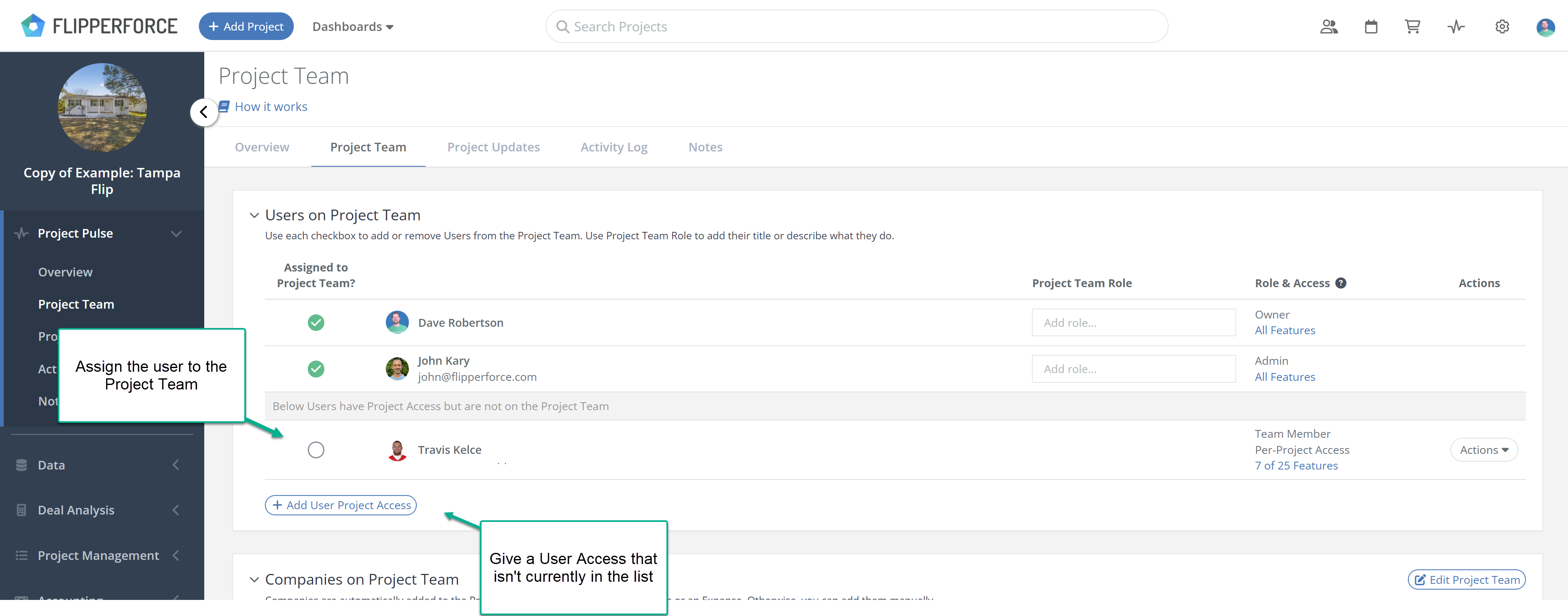
Can I add a user to the Project Team manually?

Can I add a user to the Project Team manually?

Yes, find the user in the list on the Project Team tab and toggle the checkbox next to their name.

Yes. On the Project Team tab, find the user in the list and toggle the checkbox next to their name to add them to the Project Team. Any user who has been granted project access will appear in the list and can be manually added to the team at any time.
Related Video

Project Team - Always Know Who's Running Your Flip | FlipperForce
Learn how the new Project Team feature automatically tracks your internal team members and companies on every flip, so you always know who's managing the project and how to reach them.
4:13

Related FAQs

Still Have Questions?  DaveBot can help!

Get immediate, feature-specific answers without digging through articles. DaveBot is here 24/7 to provide detailed explanations, troubleshooting tips, and guidance on all FlipperForce tools.
Chat with DaveBot (Be Nice, I'm in Beta)!