Overview
In order to successfully flip houses you need to be able to analyze deals and estimate rehab costs upfront to determine if a project's a good deal, OR NOT. Once you get a good deal under contract, you need to be able to manage your project schedules and track your project budgets to get your projects completed on-time and on-budget to maximize your profitability.
In this article, we will discuss the top things you should consider before choosing a house flipping software for your business.
Download our Comprehensive Checklist on How to Choose the Best House Flipping Software 👇
Best House Flipping Software Checklist
Download Our Comprehensive Checklist on How to Choose the Best House Flipping Software
PDF DOWNLOADThe eight stages of a house flip
Before you compare software tools, get clear on what tools and features you need to run your business. Every flip runs through the same eight stages, whether you do one flip per year or forty. Most software covers a few stages well, but don't cover the entire lifecycle of a house flip, so knowing the full list of software needs is what keeps you from buying half-baked a solution.
For each stage below: what you're actually trying to do, what goes wrong without the right tooling, what poor, better and best look like, then a short grading summary, then the FlipperForce solution held to that same rubric. We've kept our own answer in a separate block so you can use the rubric on any tool, including ours.
Jump to a stage:
- Find the deal — off-market data, lists, skip tracing, seller CRM
- Analyze the deal — comps, ARV, maximum allowable offer, exit modeling
- Estimate the rehab — line-item scope, cost data, scope of work
- Fund the deal — lender packets, partner pitches, draws
- Plan the work — schedule, dependencies, realistic completion date
- Run the jobsite — tasks, contractors, photos, daily updates
- Control the money — budget vs. actual, receipts, payouts
- Close the book — final P&L, 1099s, feeding the next deal
Before You Own The Property
#1 Find the deal
Sourcing properties worth analyzing, through lists, direct mail, driving for dollars, agents and wholesalers.
#2 Analyze the deal
Running comps, setting the after repair value, and working out the most you can pay and still make your margin.
#3 Estimate the rehab
Pricing the rehab line by line, so the number you offer for the property is a number you can actually build to.
4. Fund the deal
Lining up the money and producing the packet a hard money lender or a partner needs to say yes.
After You Close On the Property
#5 Plan the Work
Sequencing the trades into a schedule with real dates and dependencies, so you know what is blocking what.
#6 Run the jobsite
Assigning tasks, tracking progress, logging photos, and keeping documents and contacts in one place.
#7 Control the money
Tracking what you are actually spending against the budget, capturing receipts, and paying contractors.
#8 Close the book
A final profit statement built from what the project actually cost, not what you projected at acquisition.
Stage 1. Find the deal
Stage 1 is where you find properties worth analyzing. Before you can evaluate anything you need a pipeline of potential deals, and ideally ones the rest of the market has not seen yet.
There are two problems here. The first is sourcing. Listed properties are priced at retail and you are bidding against everyone else, so most investors who do this consistently work off-market, which means building lists of likely sellers, finding contact information, and running outreach by mail, phone or text. That is volume work and it does not happen without tooling. The second problem is follow-up. Most sellers do not transact on first contact, so leads need to be tracked and worked over weeks or months. A seller who called you in March is worth nothing if there is no record of the conversation by May.
What to look for. If you are evaluating software for this stage, look for:
- Nationwide property data with filters for absentee owners, equity, liens, pre-foreclosure and similar criteria
- List building and list stacking, so you can find owners who appear on more than one distress list
- Skip tracing to get phone numbers and email addresses for the owners you identify
- Outbound campaign tools across direct mail, email and text
- A CRM that tracks each lead's status and prompts follow-up
- Reporting on cost per lead by campaign, so you know which channel is worth more money
Grading Deal Finding Software
No way to capture or store a lead. A calculator with no memory. You analyze a property and the fact that you ever looked at it disappears.
You can import a lead list and hold contacts in a basic CRM, but follow-up is manual and you'll forget.
Its own data source with real stacking filters, skip tracing, an inbound capture site, outbound across mail, email and text, automated follow-up sequences, and cost per lead reported by campaign so you know which channel is worth more money.
We don't do this, and we're not going to pretend otherwise. FlipperForce has no lead generation of any kind.
- No bulk property data researching, lists or stacking filters
- No skip tracing
- No direct mail, email or text campaigns
- No seller CRM or follow-up sequences
If finding deals is your bottleneck, FlipperForce solves the wrong half of your business. Buy a lead tool first and come back to us when you're closing them. See
REsimpli and
PropStream below.
Stage 2. Analyze the deal
Stage 2 is where you determine the maximum purchase price you should offer for the property. You found a deal in stage 1. Now you need to decide what it is worth to you.
Getting there means crunching a number of figures: what the property will be worth after repairs, what those repairs will cost, and what it will cost you to buy, hold, finance and sell it.
Most investors start out doing this in a spreadsheet, and a spreadsheet works right up until it doesn't. The usual problem is leaving costs out. Buying costs, holding costs, selling costs and financing costs are the ones that get forgotten, and they are often the difference between a deal that pencils and one that doesn't.
The other problem is consistency. If your formulas live in a spreadsheet you have copied twelve times, you can't be certain the deal you analyzed this week used the same math as the one you analyzed last month.
What to look for. If you are evaluating software for this stage, look for:
- A deal calculator that standardizes how you analyze every property, so the process is identical each time
- Flexibility on buying, holding and selling costs, as a lump sum or itemized, whichever you prefer
- A detailed financing calculator so you can structure your loan and funding strategy
- A maximum purchase price calculation, so the software tells you what to offer instead of making you back into it yourself
- Comparable sales research to support the after repair value you are using
- The ability to turn the analysis into an investment packet you can share with partners and lenders
Grading Deal Analysis software
A single input box for value, or an automated valuation presented as fact. Worse, an average of several automated valuations, which is just the average of several guesses and lands further from the truth than the best of them.
Real comps from a paid data source that you select yourself, with itemized inputs you can adjust.
Comps you can adjust for actual differences between properties, the way an appraiser does. Maximum allowable offer worked backward from the profit you require. Multiple exit strategies and multiple financing structures modeled side by side. Formulas locked so the math is identical on every deal and nobody can break a cell. Output you can hand to somebody else.
The analysis suite works backward from the profit you require, and the math is locked so it's identical on every deal.
- Flip Analyzer. Enter after repair value, purchase price and repair costs, then handle buying, holding and selling costs as a lump sum or itemized. It returns projected profit, margin, and the maximum purchase price you should offer.
- Financing calculator. Structure hard money, private money or cash, including points and interest, so financing costs are in the deal rather than estimated afterward.
- BRRRR Analyzer. Models the buy and hold exit instead, with cash flow, refinance and long-term equity capture.
- Comps. Market comparable sales research built in, to support the after repair value you enter.
- Investment Reports. Turns the completed analysis into a packet you can share with a lender or partner as a link.

One honest note: compare FlipperForce's comps data source against anything else you're considering. Data quality is what separates real analysis tools from pretty ones, and you should check ours rather than take our word for it.
Stage 3. Estimate the rehab Costs
Stage 3 is where you determine what the renovation will cost. You need this number before you can finish stage 2, because repair cost is the largest variable in your maximum offer, and it is also the number you will manage against for the rest of the project.
Most investors estimate renovation costs inaccurately, and there are a few reasons why.
Pricing from a rule of thumb, whether that is dollars per square foot or a round number per room, produces a figure with no detail behind it, which means there is nothing to check when the bids come back higher. A blank spreadsheet has the same problem in a different form: the structure is there but the costs come from memory, and they go stale.
Then there is the scope itself. If you hand three contractors a vague description, you get back three bids that price three different jobs, and you cannot compare them. Finally, most investors build the estimate in one place and the budget in another, so the estimate gets retyped, and the two drift apart from day one.
What to look for. If you are evaluating software for this stage, look for:
- Line items organized by trade or category rather than a single lump sum
- A cost database behind those line items, so you are not typing prices from memory
- The ability to adjust costs to your own market and your own subs
- Saved templates, so a cosmetic rehab does not start from a blank screen every time
- A printable scope of work you can issue to contractors, so every bid prices the same job
- The estimate carrying forward into the project budget automatically, with no re-entry
Grading Rehab Estimating Software
One lump sum, or dollars per square foot and nothing else. A spreadsheet with no cost data behind it sits here too.
Itemized line items, but you supply every price. Or prefilled national averages, never updated and not adjusted for your market.
Line items by trade priced from a maintained cost database, saved as templates, with a printable scope of work, and the estimate becomes the budget.
The
Rehab Estimator produces both outputs this stage requires: a defensible repair number and a scope your contractors can bid.
- Line items by trade, priced from a maintained cost database rather than typed from memory
- Saved templates, so your third cosmetic flip doesn't start from a blank screen
- Printable scope of work, so every contractor bids the same job and you can compare bids that actually match
- The estimate becomes the budget in the Project Budgeter, with no re-entry and nothing to retype

That last point is the one we'd point at hardest. Very little else on this list carries the estimate forward into the budget, and it's where estimating stops being paperwork and starts being useful.
Case Study: How to Estimate Rehab Repair Costs
Case Study: How to Estimate Costs for a Cosmetic Rehab
Case Study: Estimating Rehab Costs per SF
Stage 4. Fund the Deal
Stage 4 is where you secure the money. Most flips are bought with hard money, private money, a partner, or some combination, which means somebody other than you has to be persuaded the deal is sound.
The problem is presentation and repetition. A lender or partner needs to see the property, the comparable sales, the repair budget, the timeline and the exit, and they need it in a form they can evaluate quickly. Assembling that by hand for every deal is slow, and it tends to come out different each time, which does not inspire confidence. Speed matters too, because on a competitive deal the investor who can put a complete packet in front of a lender the same day has an advantage over one who needs an evening to build it. Then once the loan is in place there is a second, separate job: requesting construction draws as work completes, which requires tying the request back to the budget the lender approved.
What to look for. If you are evaluating software for this stage, look for:
- An investment report generated from the analysis you already completed, rather than rebuilt from scratch
- Comparable sales, repair budget, projected returns and exit strategy in one document
- Control over which sections a given audience sees, since a private partner and a hard money lender want different things
- A shareable link, so a lender can open it without downloading anything or creating an account
- Repeatability, so the fifth packet takes minutes
Grading Raising Money Solutions
One generic report, one exit strategy, minimal detail. Or nothing, and you build it yourself.
Several report formats covering different strategies and audiences.
Configurable sections including overall project financials, detailed scope of work, project photos with the ability to create a shareable link, generated from the deal itself, repeatable.
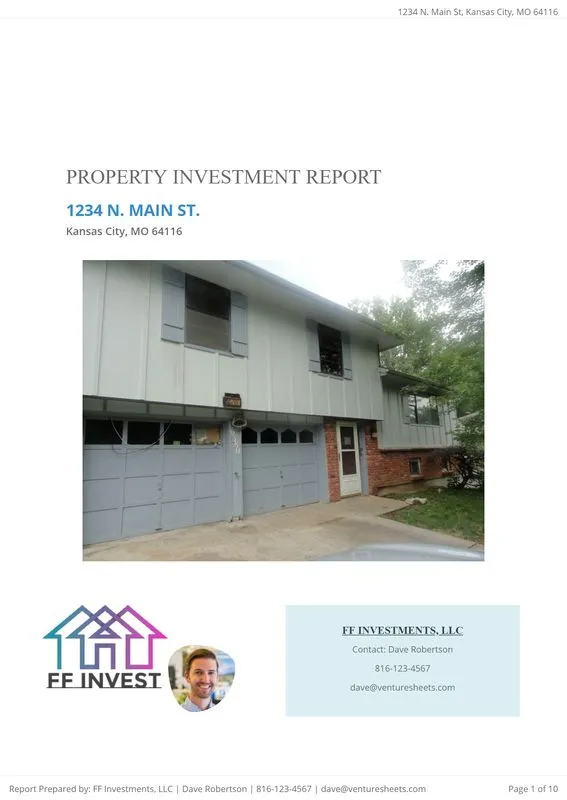
Investment Reports turn the work you've already done into something you can put in front of money.
- Comps, budget, projected returns and exit pulled into one document, generated from the deal rather than rebuilt
- Shareable link, so a lender can open it without downloading anything or creating an account
- Repeatable, so the fifth packet takes minutes instead of an evening
5. Plan the work
Stage 5 begins the day you close. You own the property, holding costs have started, and you need a construction schedule that tells you what happens when and what the realistic completion date is.
The problem is dependency. Renovation trades run in sequence, and most of them cannot start until something else finishes. Demo has to be done before rough-in, rough-in before drywall, drywall before paint. When one trade runs three days long, everything behind it moves, and if your schedule is a flat list of dates it will not tell you that. You find out when the painter you booked for the 14th shows up to a house that is not ready, and takes another job. The second problem is scale. Running two or three projects at once means the same crews are committed in more than one place, and you cannot see those conflicts unless the schedule shows every project together. All of this costs money directly, because every additional week is interest, insurance, utilities and taxes.
What to look for. If you are evaluating software for this stage, look for:
- A schedule with real dependencies, so moving one task moves everything downstream
- A completion date that updates automatically when something slips
- Schedule templates by project type, so a kitchen and bath refresh starts from a known sequence
- A view across every active project at once, to catch crew conflicts
- Calendar sync with Google or Outlook
Grading Project Planning Software
No schedule at all, or a flat list of dates with nothing connecting them. Moving one date changes nothing else, so the schedule lies to you the moment reality moves.
A task list with dates and assignees, but you are the dependency engine.
True dependencies, templates by project type, a cross-project view, and calendar sync.
The
Project Scheduler is where the gap between FlipperForce and other deal analysis only tools is widest, because most of them have nothing here at all.
- Gantt schedule with dependencies, so when demo slips three days everything downstream moves and you see the new completion date immediately
- Schedule templates by project type, so a kitchen and bath refresh starts from a known sequence
- Calendar with Google and Outlook sync, so it lives where the rest of your week lives
- Cross-project visibility, because that's where your crews actually conflict

6. Run the jobsite
Stage 6 is executing the schedule day to day. Assigning work, confirming contractors show up, documenting what has been done, and finding problems early enough to fix them.
The problems here are record keeping and access. When work is assigned by text message there is no record of what was agreed or when it was due, so accountability comes down to one person's recollection against another's. When progress lives in your phone's camera roll, you cannot show a lender or partner where the project stands without driving there, and you cannot demonstrate what a space looked like before a change order.
What to look for. If you are evaluating software for this stage, look for:
- Task assignment with an owner, a due date and automatic reminders
- Subtasks and reusable task templates for work that repeats across projects
- A photo log organized by project and date, not a general file dump
- Daily progress updates the team can post from the field
- Full functionality on a phone, not a cut-down mobile view
Grading Jobsite Management Software
No task assignment, no photo organization, and it only works at a desk. Software that requires a laptop doesn't get used on a jobsite, so it doesn't get used.
Tasks with assignees, and photos dumped into a general file area with no structure.
Tasks with owners, due dates and reminders that fire without you. A photo log organized by project and date. Daily progress updates the team can post from the field. Roles and permissions so a contractor sees their scope and not your margins. All of it usable one-handed on a phone.
Everything here works from a phone, because that's where you are. Software that needs a laptop doesn't get used on a jobsite, so it doesn't get used.
- Project Updates, daily progress logs the team posts from the field
- Photo Log organized by project and date rather than dumped in a camera roll
- Task Manager with owners, due dates and email reminders, plus subtasks and reusable task templates.
.webp)
Note: FlipperForce's mobile app currently doesn't support Tasks. We will likely have Tasks in the mobile app by the end of 2026 to provide task management from the job site.
7. Control the money
Stage 7 runs alongside stages 5 and 6 rather than after them. While the work happens, money leaves in every direction, and you need to know what you have actually spent against what you budgeted while there is still time to act on it.
The failure here is rarely one large mistake. It is a series of small ones that nobody totals until the end. Receipts get lost between the store and the office. Expenses get recorded weeks late, if at all. A change order gets agreed verbally on site and never makes it into the budget. Contractor payments across several scopes get muddled, so you are not certain what has been paid against what. Underneath all of it is the core problem: if expenses are only recorded and never compared to a baseline, you cannot tell whether you are over until the project is finished, and by then nothing can be done about it.
What to look for. If you are evaluating software for this stage, look for:
- Budget versus actual by line item, updating as expenses are entered
- The budget populated from your stage 3 estimate rather than rebuilt
- Receipt capture from a phone at the point of purchase
- Contractor payment tracking against each scope, so you know what is paid and what is outstanding
- Variance visible on the screen rather than requiring you to build a report to find it
Grading Project Job Costing and Accounting Software
No expense tracking, or one field for total spend. You find out how the project went when it's over.
You can log expenses, but there's no budget baseline to compare them against. You know what you spent. You don't know whether it was too much until you build a spreadsheet to find out.
Budget versus actual by line item, live, so you can see the plumbing bucket running hot while the plumber is still on site. Receipt capture from your phone at the register, because a receipt you plan to enter later is a receipt you've already lost. Contractor payment tracking against each scope. Variance visible without you assembling a report to find it.
This is the stage the whole platform is built around: catching the overage while the plumber is still on site, not in month five.
- Budget vs Actuals compares actuals to the estimate you already built, line by line, live
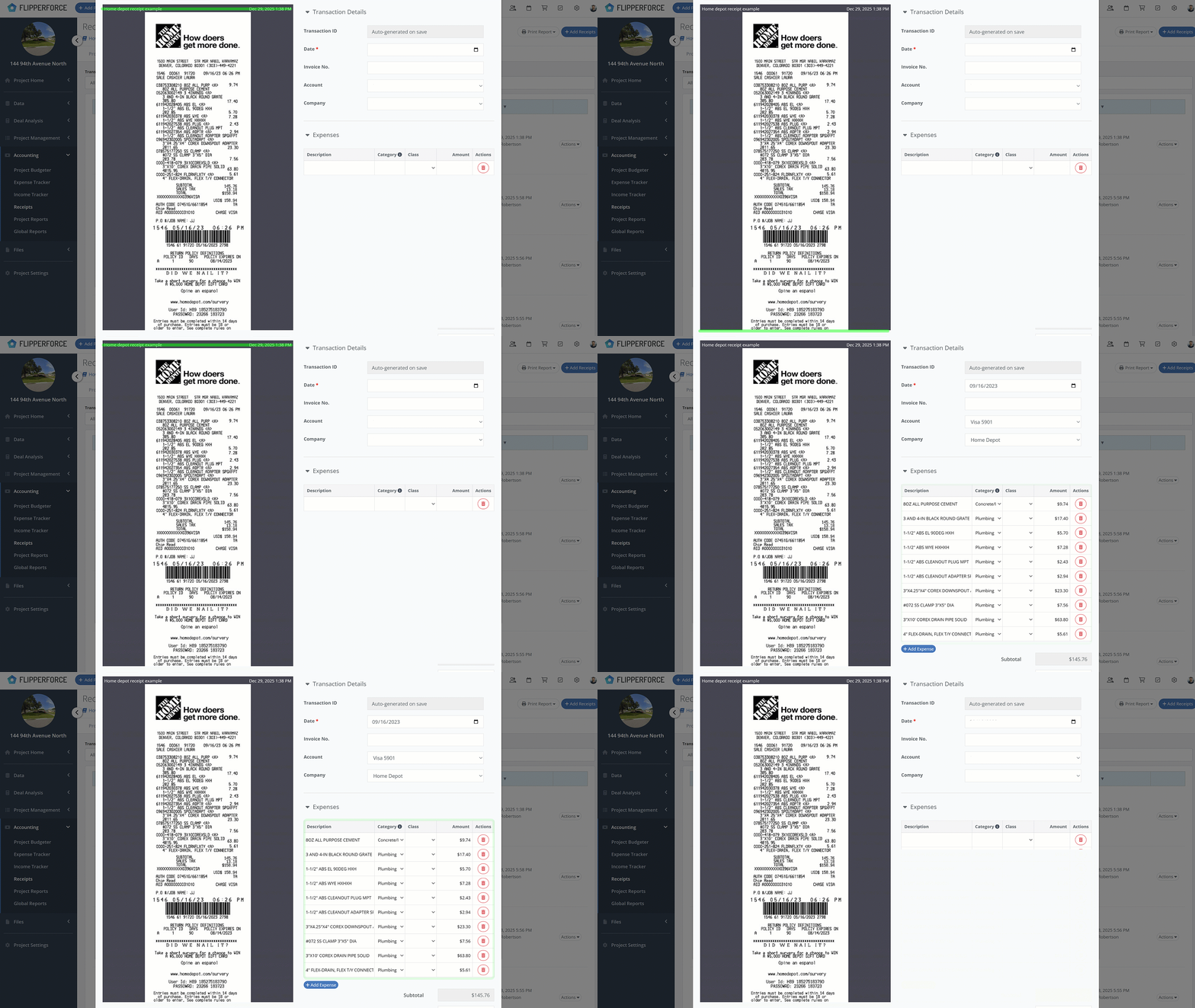
- Expense Tracker captures receipts from your phone at the register, with AI receipt analysis pulling vendor and amount off the image
- Expense Reports track what each contractor has been paid against each scope
- Variance visible without you assembling a report to go find it
8. Closing Out the Project & the books
Stage 8 comes after the sale. You need to know what the project actually made, produce clean records for your accountant, and carry what you learned into the next deal.
Most investors handle this badly because the data was never collected in a usable form. If expenses were tracked loosely or not at all, the profit and loss has to be reconstructed at the end from bank statements and memory, which is slow and approximate. Contractor payments have to be totalled by hand in January to issue 1099s, which is a task that gets rediscovered every year. And the most valuable output gets skipped entirely: the actual costs from a completed project are the best possible input to your next estimate, but only if they are recorded in the same structure your estimator uses.
What to look for. If you are evaluating software for this stage, look for:
- A final profit statement generated from the actuals you already tracked
- Contractor payout totals ready for 1099 filing
- Portfolio reporting across completed projects, so you can see patterns rather than one deal at a time
- Completed project costs feeding back into your estimating, so your numbers improve with each deal
Nothing. The project ends and you rebuild the story from a bank feed.
Expenses export to CSV and you build the profit and loss yourself.
A final profit statement generated from tracked actuals, contractor payout totals, portfolio reporting, and costs feeding the next estimate.
The close is generated from what you already tracked, rather than reconstructed at the end.
- Final Profit Statement built from the expenses recorded against the budget, not assembled by hand
- Contractor payout totals ready for 1099s at year end
- Portfolio view across completed projects, so you can see patterns rather than one deal at a time
House Flipping Software Comparison At-A-Glance
Each software compared against the eight stages. Full = built for it. Partial = present but lighter than a dedicated tool. None = not in the product.
Scroll the table sideways to see every tool.
Deal Analysis vs Project Management: Where the Line Falls
That line across the middle of the table is the whole decision.
Everything above the line happens before you own anything. Almost every tool sold as house flipping software competes here, because it is the easier half to build. Look at the subtotals and you can see it: two tools score a perfect four of four on the front half and zero on the back.
Everything below the line happens on a jobsite. Scheduling and contractor coordination, daily jobsite management, deep job costing with budget versus actual at the line-item level, receipt and expense tracking, and a final profit statement at the end. That is the line between a deal analysis or lead generation tool and an all-in-one platform that can carry a property from first contact through to completion.
It matters because underwriting only produces a projection. It tells you what the deal should make if everything goes to plan. Execution decides what it actually makes. A property bought at the right price still loses money when the schedule slips six weeks, the budget runs well over, and nobody catches it until the sale. The margin you underwrite is not the margin you realize, and everything between those two numbers happens in stages 5 through 8.
That is the argument for a project management and job costing feature set, and it is why the back half of this table is worth as much of your attention as the front.
One honest caveat. On your first deal or two, you probably do not need it. You have one project, you are on site constantly, and a spreadsheet will hold the budget. Buy for the stage you are weakest at, not the stage you expect to reach. The point at which this changes is usually a second concurrent project, or the first time somebody other than you is spending your money.
Software Comparison
What it Does Well
The estimate you build during due diligence becomes the budget you track actuals against once you close. The schedule, expenses and final profit statement all reference the same project, so nothing is re-keyed and nothing drifts. Full breakdown is in the eight stages above.
Where It’s Lacking
No lead generation at all. Graded poor on stage 1. If finding deals is your bottleneck, pair FlipperForce with a lead tool or start there instead.
What Differentiates It
Continuous development with a public changelog and roadmap, so you can check the pace yourself. Built out of the House Flipping Spreadsheet and in the market since 2018.
Verdict. The strongest option if you manage your own rehabs. Not the answer if your problem is finding deals.
What it Does Well
Stage 2 is genuinely excellent. Property data import from the MLS and public records, sales and rental comps, an offer calculator for maximum allowable offer, scenario modelling, and side-by-side deal comparison with metrics you configure yourself. It covers flips, BRRRR, rentals, wholesale, multi-family and commercial, and the mobile apps mirror the web app so you can run numbers standing in the property.
Where It’s Lacking
Everything after the offer. No schedule, no task management, no contractor coordination, no receipt capture, and no budget versus actual against a live rehab. Rehab cost is an input field you fill in, not an estimating system with a cost database behind it. Saved deals with status and notes are deal pipeline management, not project management.
What Differentiates It
Focus. It does one stage better than almost anything else here and does not pretend to do the rest, which is the right call for plenty of investors and is why it costs less than an all-in-one.
Verdict. Best pure deal analyzer on this list. Know that it stops at the closing table.
What it Does Well
The calculators are usable on a free account and cover flips, BRRRR, rentals and wholesaling, with shareable PDF reports on Pro. The Rehab Estimator goes past a single lump sum, listing more than forty repair categories you can cost by labor and materials, by unit, or as a flat fee. And the community behind them, the forums, the podcasts, the books and BPCON, is the best education in real estate investing and has been for fifteen years.
Where It’s Lacking
The calculators do not remember anything between deals. No saved default settings, so holding costs and financing terms are retyped every time. No comps, so the ARV is a number you worked out somewhere else and entered. No saved estimate templates, so you rebuild your own pricing from an empty form on every property. And nothing at all after the offer: no schedule, no job costing, no receipt capture, no dashboards across projects.
What Differentiates It
Reach. More investors have run a deal through a BiggerPockets calculator than through anything else in this market, usually as the first tool they ever touched. That makes it the default rather than a decision, which is a different kind of advantage from a feature.
Verdict. The best free calculators attached to the best community in the industry. They analyze deals, they do not run projects, and they do not remember your pricing from one deal to the next.
What it Does Well
Lead generation and marketing automation joined to ARV analysis, rehab estimating and lender-ready reporting. For a wholesaler that is a tight loop: find a property, estimate the repairs, price the offer, market it to your buyers list, without switching tools.
Where It’s Lacking
No scheduling, no task management, no expense or receipt tracking, no budget versus actual, no final profit statement. That is defensible for a wholesaler who assigns the contract and never touches the rehab. It stops being defensible the day you keep one and flip it yourself.
What Differentiates It
The marketing automation is the piece most analysis tools do not have, and it is aimed squarely at wholesalers rather than rehabbers.
Verdict. Strong for wholesaling. Not a rehab platform, and not trying to be.
What it Does Well
Property data and seller marketing at a scale almost nothing else here matches. More than 150 million property records built up since 2005, motivated seller lists, skip tracing, direct mail and follow-up campaigns, with deal analysis attached to all of it. On comps and running the numbers to an offer, Realeflow and FlipperForce are broadly comparable.
Where It’s Lacking
Everything after you take title. No construction schedule, no task management, no photo log, no document management, no budget versus actual, and no final profit statement. Expense tracking exists, though we could not confirm how deep it goes. Pricing is no longer published either, so there is no way to compare cost without booking a conversation.
What Differentiates It
Who it is sold to. Over the last few years Realeflow has moved toward presenting itself as white-label infrastructure for brokerages, educators and technology companies rather than marketing directly to individual flippers. That is an observation about their public positioning, not a prediction. If you are an individual investor on a legacy plan, it is worth asking where that plan sits before you renew.
Verdict. For years one of the most complete platforms in this market. Worth checking where individual investor accounts sit in their current plans before you renew.
What it Does Well
The front of the funnel. Lead management, direct mail, call tracking, driving for dollars, KPI dashboards, and follow-up that does not fall through. It also carries some analysis and light rehab cost tracking, and it tracks money at a business level rather than a project level.
Where It’s Lacking
No scheduling, no jobsite task management, no line-item budget versus actual against a rehab estimate, no final profit statement per project. Its financial tracking is built for the business, not for the job.
What Differentiates It
It is not really a competitor. Plenty of investors run REsimpli alongside a rehab platform on purpose, with one clean handoff at the point a lead becomes a project.
Verdict. The best front-of-funnel pairing on this list. Bring your own rehab platform.
What it Does Well
Built around finding motivated sellers, with nationwide property data at the core. It reaches further down the lifecycle than most lead tools, adding deal calculators, rehab estimating and funding tools, so you can find a property, run the numbers, price the rehab and put a packet in front of a lender without leaving the platform.
Where It’s Lacking
Everything after you close. No schedule for coordinating trades, no task assignment, no daily logs or progress photos, no budget versus actual, no receipt capture, and no final profit statement. The rehab estimate is an input to the offer, not a budget you then manage against.
What Differentiates It
Strength and reach at the top of the funnel, with a marketing engine behind it that most investors have already come across.
Verdict. Buy it to find deals, but you will likely need a more robust project management and accounting system.
What it Does Well
Real construction management software, and strong at it. Estimating, bids, scheduling, daily logs, change orders, selections, client portals, warranty tracking and full job financials.
Where It’s Lacking
No deal analysis. No ARV, no comps, no maximum allowable offer, no flip or BRRRR projections, because it assumes you already have a signed client and a scope. Most of what it does have is built around serving that client: selections portals, change order approvals, client-facing schedules. When you flip, you are the client, so you pay for and navigate a large amount of workflow that never applies.
What Differentiates It
Depth on the construction side beyond anything built for investors, and the scale to match.
Verdict. Excellent software aimed at a different business than yours. If you build custom homes, it is probably the right answer.
Honorable Mention
PropStream and DealMachine are stage 1 tools. Strong at finding deals, no involvement in the rehab. Pair them with a project platform rather than expecting them to replace one.
Generic project management tools (Asana, Monday, Trello) can hold a rehab schedule, but you build every template, cost code and report yourself, and none of it connects to your deal numbers. You've replaced one spreadsheet with a prettier one.
The Intangibles: What a feature list won't tell you.
Everything above is checkable in a demo. The things below only show up after you've paid, and they're the difference between software you keep and software you abandon in month four with your data stuck inside it.
These matter more than investors expect, because you're not buying a product. You're entering a multi-year dependency on a company.
Support: who answers, and do they know what a draw schedule is
You'll hit a question at 7am on a Saturday standing in a property, or the night before a lender call. How fast someone answers, and whether they understand your business, determines whether that's a five-minute problem or a lost day.
- Do they provide multiple channels to ask questions (phone/chat/email)?
- Are they timely with their responses?
- Do they provide a knowledge base of FAQs?
- Who handles support? Do they outsource support to India or do they have in-house support?
HUMBLE BRAG
I personally handle all support questions and am generally available between 8AM to 5PM Mon-Fri, but also respond to questions after hours and on weekends.
As the founder and creator I know everything there is to know about our software, so I can provide much more informed responses than outsourced support teams.
Training and onboarding
Software you never learned is software you don't use. Most churn isn't a product failure, it's an onboarding failure.
- Does the software company provide video tutorials?
- Do they have case studies and examples of how to use the software?
Educational Resources
Most of our competitors and real estate guru's charge thousands of dollars to get their 'secret systems' to learn how to flip houses.
We don't think you should have to pay to learn how to flip houses which is why we created a free, online, step-by-step curriculum on
How To Flip Houses that you can use to learn how to be a better house flipper.
- Does the software company have other educational resources to help you learn how to be a better house flipper?
- Do they charge additional money for their educational resources?
Continuous Improvement: Is it still being improved?
- Does the software company frequently add new features and functionality?
- Does they have a clear product road map for the future?
- What are their short-term goals for new features?
- What are their long-term vision for the development of the software?
At FlipperForce we are constantly working on building
new features and functionality to improve our software platform.
We want our development process to be as transparent as possible so we have created a
Product Road Map that displays the features we are currently developing and provides our long-term vision for our software platform.
Collaboration with the User Base
When choosing a house flipping software you want your voice to be heard and be able to provide feedback and suggestions on new software features and functionality that will benefit you and your business.
- Does the software company provide an easy way to make feature suggestions & recommendations?
- Is the founder or development team easily accessible to collaborate and discuss ideas?
- Who is the decision maker that handles approving & developing features?
At FlipperForce we provide a
Feature Suggestion page that allows our users to make suggestions and up-vote suggestions that have been provided by other users.
We use our Feature Suggestion page to help us collaborate with our users on ideas for features and functionality and help plan our product road map for the future.
Reviews & Reputation
The real estate industry is notorious for gurus selling get rich quick schemes and 'secret systems'. A lot of these gurus work together and cross-promote each other's products so they can take the most amount of your money as possible.
- What’s the company or founder's reputation? Do you even know who they are?
- Can you find information about the Founder on Linkedin or BiggerPockets?
- Does the founder or software company have bad reviews online (Google, Facebook, BBB, BiggerPockets, etc.)?
- Do they have authentic reviews verified by a 3rd Party?
- Are they a real estate guru selling get rich quick schemes & 'secrets'?
- Do they promote other real estate guru's get rich quick schemes & 'secrets'?
- Do they constantly bombard you with emails up-selling you on new 'investing secrets'?
- Do they have pictures on their website of people on the beach, fast cars and yachts?
The truth is flipping houses is hard and there are very
real risks that you won't succeed.
If a company tries to sell you on get rich quick strategies and lavish lifestyles and/or associate themselves with other real estate gurus, they likely don't have your best interests in mind. Ultimately, these guru's just want to take the most amount of money out of your pockets as possible for themselves and their guru buddies.
Here's a few of our verified 3rd party review Below!
I spent years searching for the right spreadsheet or software before I found FlipperForce. It's been a game changer. I use it to analyze deals, track my projects, estimate repair costs, and build budgets. The reporting they provide, especially the account reports, used to be a hectic process for me. Now everything's streamlined and flows in one place. It's an all in one platform with everything you need from the buy to the resale and the best out there!
Flipper Force has totally upgraded my business. We used to run on spreadsheets before switching and now everything is on one platform which makes it streamlined for our team and for me as the owner. I run my entire business with Flipper Force now and love all the upgrades to the system that are always being implemented.
The best software specifically built for softwares that I've come across, it combines the ability to manage projects, analyze deals, and has tools that will put that data directly into pitch decks for investors and lenders. The software is very intuitive and simple to use, and the customer service from the Flipper Force team is exceptional. They are open to feedback and available at any time to help us enhance our use of the platform.
We take our reputation very seriously and stand behind the quality of our product & service. We aren't perfect, but admit our mistakes and strive to alway's do what's right!
Who built it, and how long have they been here
In 2026 anyone can spin up a plausible-looking SaaS product in a weekend. Plenty have. The question is whether the people behind it have ever underwritten a deal, managed a sub, or eaten a cost overrun.
Ultimately, when you choose a software solution, you want to choose a team that has big dreams and visions for their platform that are committed to continuously improving their product and service.
You want a software platform that is committed to collaborating and working together with their users to build a platform that is truly built for the community, by the community.
You want a software platform that will be transparent about their development process and honest and willing to take accountability if/when they mistakes.
And above all, you just want to pick a software platform and team that you can trust and know will do what's right!
FAQs
What is the best software for flipping houses? It depends which of the eight stages is your bottleneck. For running rehabs end to end, FlipperForce. For analyzing deals only, DealCheck. For finding deals, a lead generation tool. Most investors end up with one tool for the front of the funnel and one for execution.
Is there free house flipping software? Yes, with limits. FlipperForce, DealCheck have free software plans for analyzing deals with limited capabilities.
Can one tool handle both finding and flipping houses? Very few. Look at the coverage table: the tools strong at finding deals almost all stop at the closing table. Running a lead tool alongside a rehab platform is the normal setup, not a compromise.
What's the difference between house flipping software and construction management software? Construction management software assumes you have a client. House flipping software assumes you are the client.