Companies & Contacts

What is the Tax and Insurance column in Companies and Contacts?

What is the Tax and Insurance column in Companies and Contacts?

The Tax & Insurance column shows each company's W-9 status and Workers Comp and General Liability expiration dates directly in your Companies list, color-coded so you can spot expired or expiring coverage at a glance.

The Tax & Insurance column gives you a compliance snapshot for every company in your workspace without opening a single record.

What it shows

The column displays three pieces of information per company:
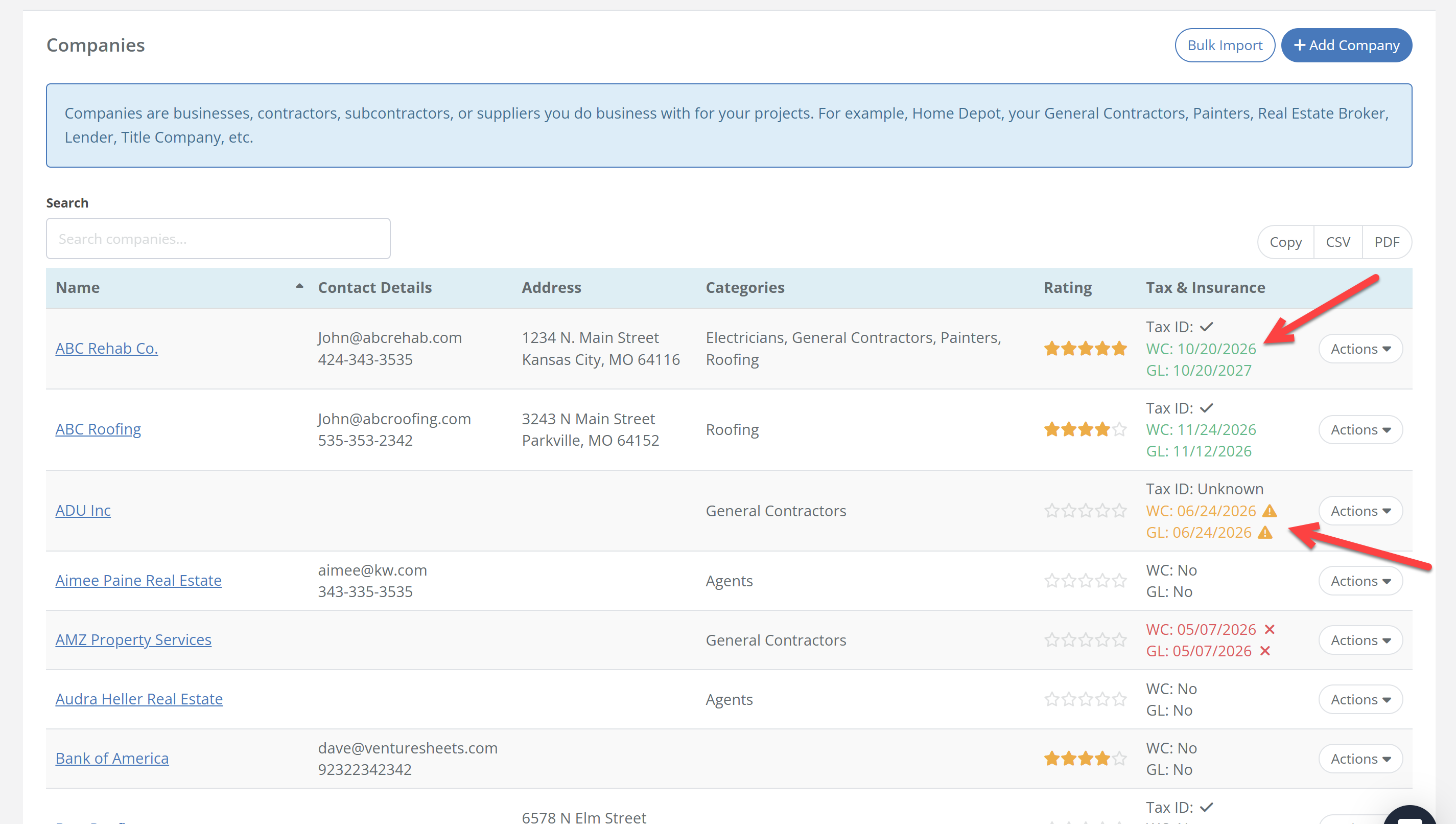
  • Tax ID — a checkmark indicates a W-9 is on file for that company.
  • Workers Comp (WC) — the expiration date for the contractor's Workers Compensation insurance certificate.
  • General Liability (GL) — the expiration date for the contractor's General Liability insurance certificate.
image

Why it matters

Working with uninsured contractors creates real liability exposure on your projects. This column lets you scan your entire contractor list in seconds before pulling someone onto a job, and catch expiring policies before they lapse.

How to update this information

Insurance dates and Tax ID status are managed inside each company's profile. Navigate to Companies and Contacts, open a company record, and enter or update the certificate details in the Tax & Insurance section.

Disclaimer: FlipperForce does not provide tax, legal, or accounting advice. This FAQ is for informational purposes only. Consult a qualified professional before making compliance decisions.

Related Video

Related FAQs

Still Have Questions?  DaveBot can help!

Get immediate, feature-specific answers without digging through articles. DaveBot is here 24/7 to provide detailed explanations, troubleshooting tips, and guidance on all FlipperForce tools.
Chat with DaveBot (Be Nice, I'm in Beta)!