What details are included in my synced calendar events?
What details are included in my synced calendar events?
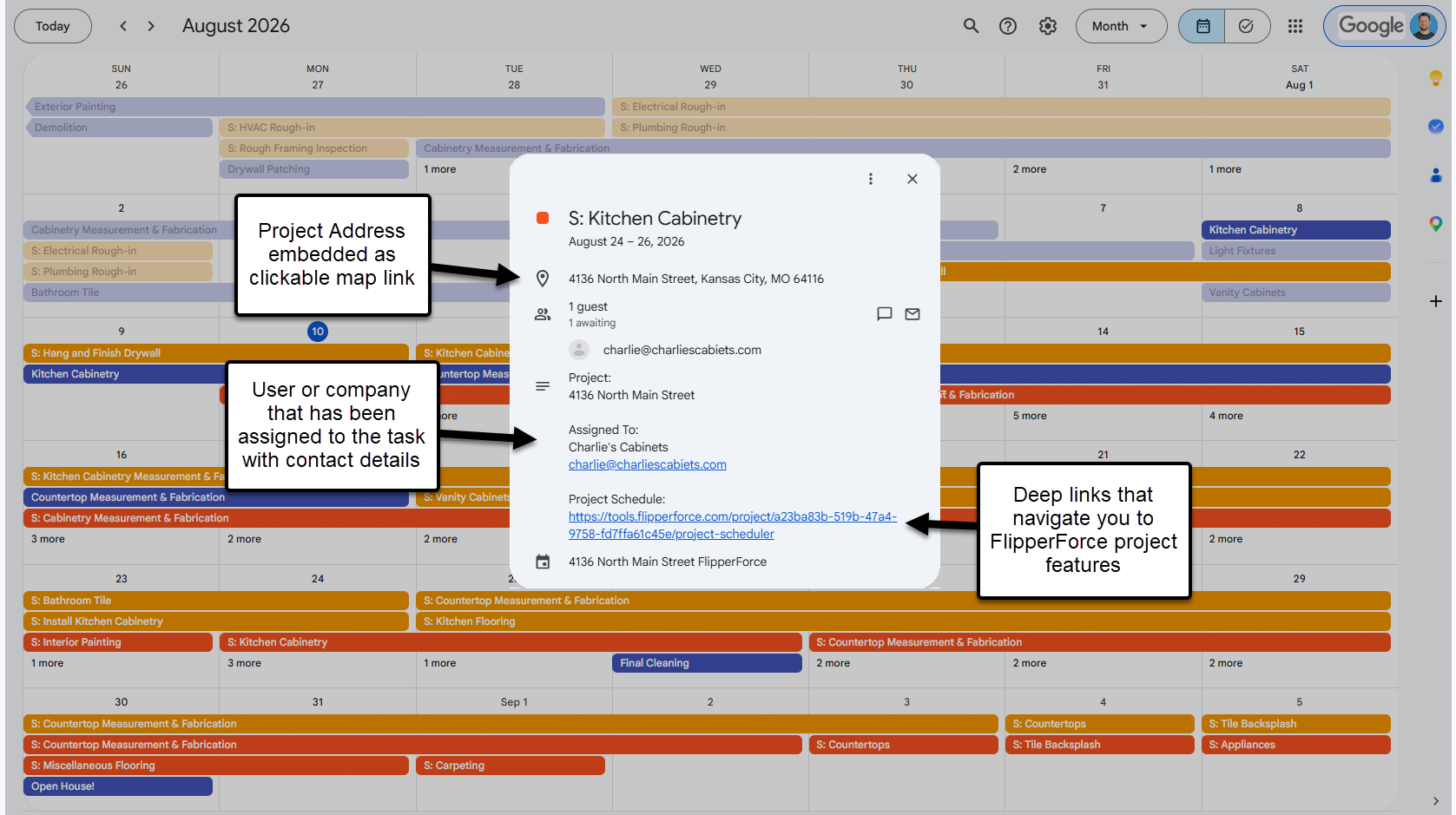
Every synced event includes the project address, the project name, who the item is assigned to with their contact details, and links back into FlipperForce.
When you open a FlipperForce event in Google Calendar, Microsoft Outlook, or Apple Calendar, the event includes:
Project address, included as a clickable map link so you can get directions to the job site.
Project name, so you know which property the item belongs to.
Assigned to, showing the user, company, or contact along with their email and phone number.
Links back into FlipperForce that take you to the Project Scheduler, Task Manager, or Calendar.
Task notes, for items created in the Task Manager.
There is nothing to turn on. These details are included automatically on both the Workspace Calendar link and Project Calendar links.
The links back into FlipperForce require you to be logged in and to have access to that tool on your plan.
Get immediate, feature-specific answers without digging through articles. DaveBot is here 24/7 to provide detailed explanations, troubleshooting tips, and guidance on all FlipperForce tools.