It appears I'm in the wrong workspace? How do I change workspaces?
It appears I'm in the wrong workspace? How do I change workspaces?
If you have access to multiple workspaces, you'll see a Select Workspace screen immediately after logging in. If you land in the wrong one, click the top-right dropdown menu and select Change Workspace to switch without logging out.
Selecting Your Workspace After Logging In
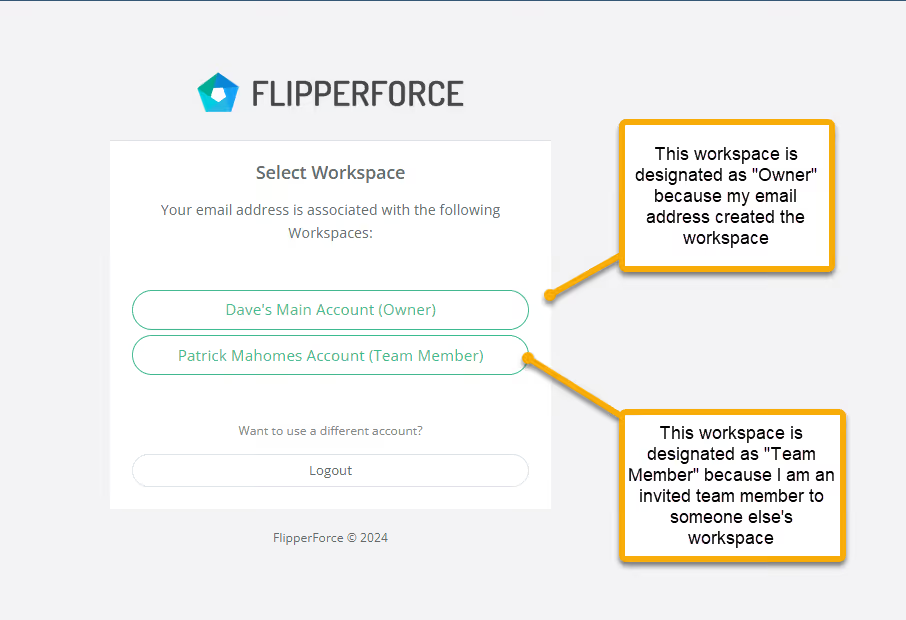
If your email address is associated with multiple workspaces, you will be shown a "Select Workspace" screen when you initially login.
Changing Your Workspace
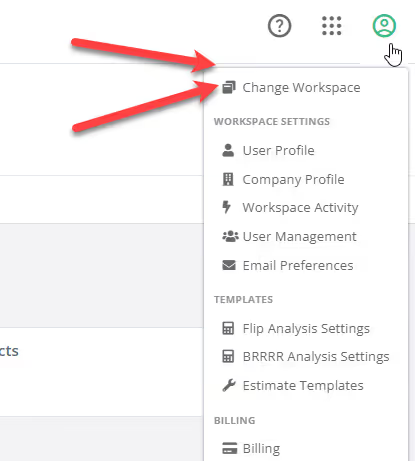
If you happen to login to the wrong Workspace, you can change your Workspace by navigating to the top right dropdown menu and clicking "Change Workspace".
Get immediate, feature-specific answers without digging through articles. DaveBot is here 24/7 to provide detailed explanations, troubleshooting tips, and guidance on all FlipperForce tools.