Draw request package for your lender

Ask your AI Agent to pull everything you have spent since your last draw and build the lender package, with any missing receipts flagged up front.
The Prompt
Copy and Paste this to your AI Assistant
Copy Prompt

Please build my draw request package for [PROJECT NAME].

1. Pull every expense line item on that project dated on or after [LAST DRAW DATE]. If I have not given you a date, ask me for one before you pull anything.

2. Group the line items by expense category with a total per category and a grand total. Use the totals the API returns for the full filtered set, not the totals of the page you happened to read.

3. For each line item, check whether its parent transaction has a receipt attached. Put every line item with no receipt in a section at the top called Missing backup, with the vendor, date, amount and description. Lenders reject these first.

4. Pull the progress photos posted on the project in the same date window and list them with their dates so I can attach them as proof of work.

5. Give me the package in this order: a short summary with the total I am requesting, the missing backup list, the category breakdown, the full line item detail with vendor and invoice number, and the photo list.

6. Flag anything that would make a lender ask questions. A large amount sitting in a generic category, a line item with no vendor attached, or two identical amounts on the same day.

Change nothing.

FlipperForce has no draw object yet, so this automation separates draws by date. You supply the last draw date and it reads forward from there. If you want a harder record than a date, create an expense account named for the draw and assign the approved line items to it in the app, then filter on that account next time. That is a convention you maintain, not a feature.

Expense line items are read one project at a time, so scope this to the single project you are drawing on.

The Problem

Hard money lenders want three things for a draw. A list of what you spent, the receipts behind it, and photos proving the work happened. FlipperForce holds all three. They just live on different pages.

So every draw turns into an hour of exporting, cross checking which receipts you actually have, and rebuilding the same summary you built last month. Then the lender sends it back because four line items had no backup.

The Solution

Your assistant reads the expense line items on the project, filtered to everything dated after your last draw, then checks each parent transaction for a linked receipt so you see your backup coverage before your lender does. It pulls the progress photos from the same window for proof of work.

The output is ordered the way a lender reads it. Total requested at the top, the gaps you need to fix next, then the detail behind the number.

What it will not do: this automation is read only. It does not tag expenses to a draw, mark anything as drawn, guess at an amount, or create a receipt where one is missing. It tells you what is missing and leaves the fixing to you.
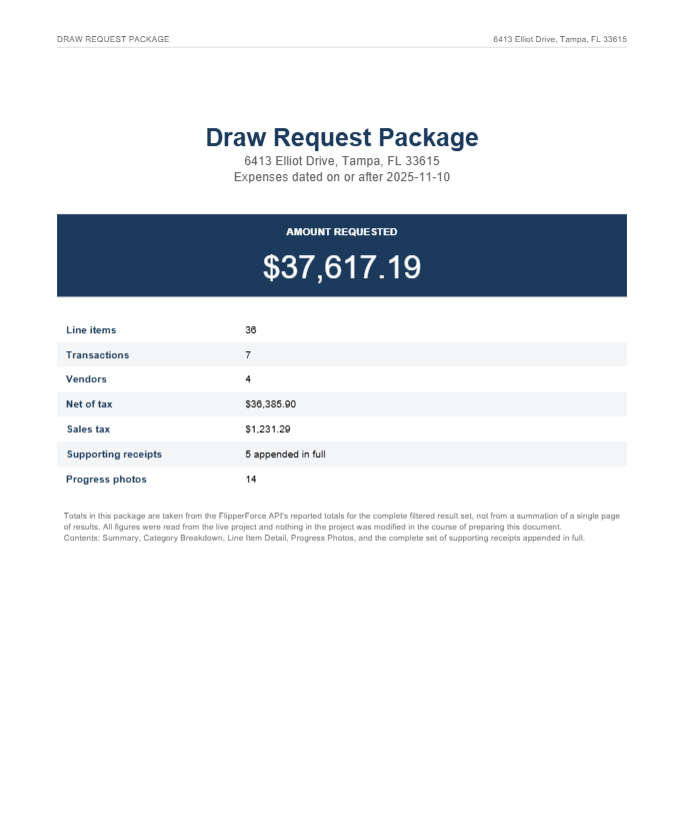
Photo Log
Expense Tracker
Receipts
FlipperForce
Expenses, receipts, photos
Your assistant
Groups and checks backup
Lender package
Nothing is changed
General Setup

This prompt requires a connection to the FlipperForce Public API. Once your AI agent is connected to your account, you can run any prompt in the library.

Learn how to connect your AI agent to the FlipperForce Public API

Considerations Before You Run this Prompt:

Before you run this, check:

  • Your AI is connected to FlipperForce.
  • You know your last draw date. FlipperForce has no draw object, so the date is the only thing separating this draw from the last one.
  • Your receipts are linked to transactions, not just uploaded. A receipt sitting unlinked in the Receipts area will show up here as missing backup. Run the unfiled receipts audit first if you are not sure.
  • The expenses you are drawing on are actually entered. Anything you paid but never recorded will not appear.

Run this the day before you submit, not the morning of. The missing backup list usually has a few items on it and you will want time to go find those receipts.

Other AI Prompts