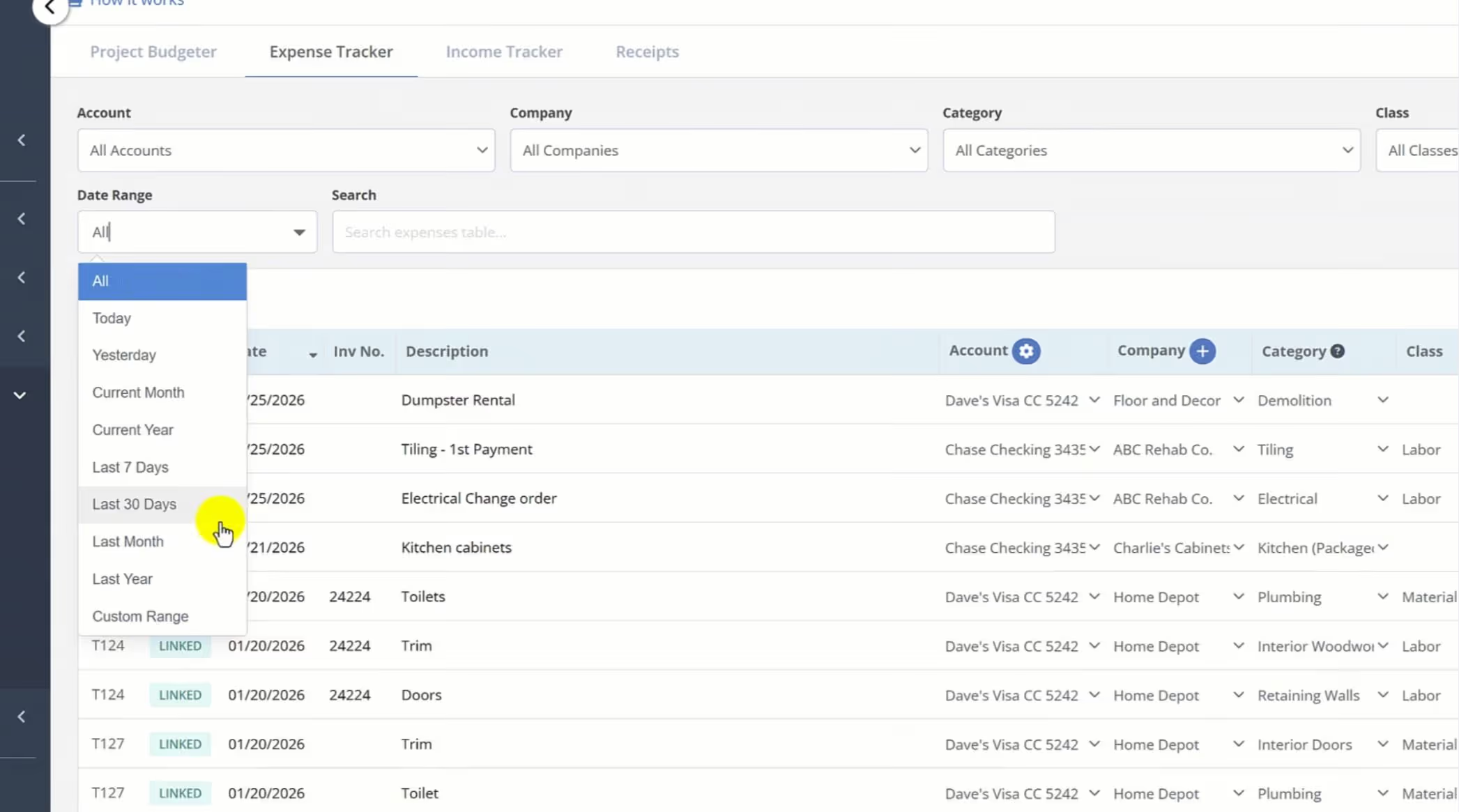
Based on your feedback, we've rolled out new Date Range filters across the Expense Tracker and core Accounting Reports, giving you total control over how you view and manage your project spending.
🕒 New Date Range Picker
The Expense Tracker now features a versatile date range selector (shown above). Instantly filter your data by:
Quick Presets: Today, Yesterday, Last 7 Days, or Last 30 Days.
Period Views: Current Month/Year vs. Last Month/Year.
Custom Range: Total flexibility to select any specific window.
📊 Upgraded Accounting Report Filters
To streamline your reporting, we’ve integrated these filters into several key areas:
Expense Summary & Category Reports: Now include the Date Range filter.
Vendor & Invoice Reports: Added Date Range and Company filters.
Account Expense Report: Added Date Range, Account, and Company filters—plus a new Company column for better visibility.
The FlipperForce Field mobile app now uploads photos and receipts faster and more reliably on iOS and Android. A new My Recent Uploads inbox lets you track progress, retry failed items, and run multiple upload batches at once.
FlipperForce now has a full dark theme across the web app and the FlipperForce Field mobile app. Choose Light, Dark, or System to match how and where you work.
The Daily and Weekly Digest emails summarize tasks, schedules, and events across your projects. Both now lead with a Work Assigned to Me section, so you see your own overdue, due today, and upcoming work before everything else in the workspace.
The AI Receipt Analyzer now accepts .doc and .docx files. Upload a Word invoice from a contractor or vendor straight into your receipts and analyze it without converting it to a PDF first.
Read, create, and update materials in your catalog through the Public API, so you can import past purchase history and refresh your pricing without manual data entry.


.avif)



.png)