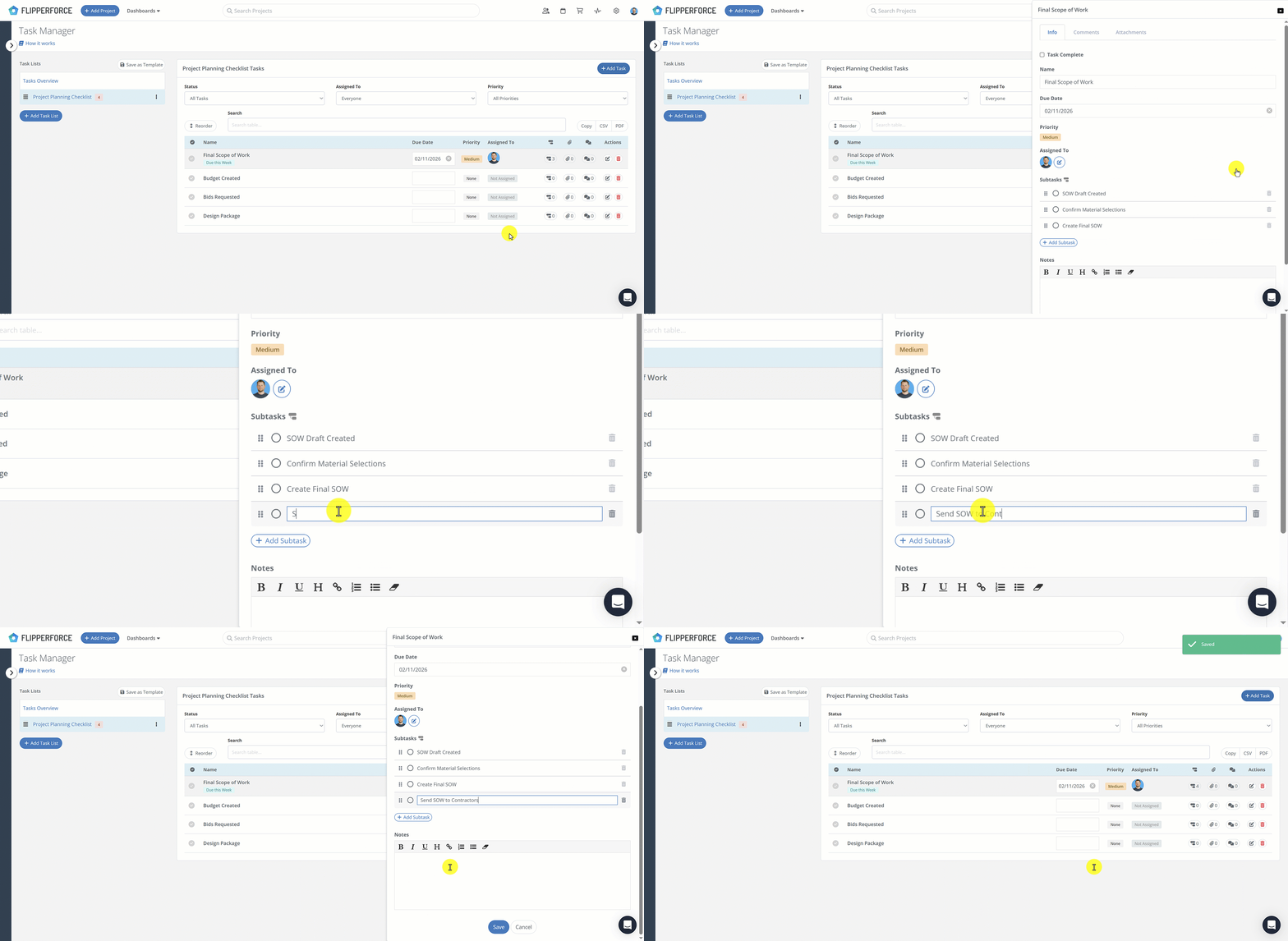
Subtasks allow you to break down large project milestones into smaller, actionable checklists. While our Task Manager is designed to track your high-level project schedule, subtasks handle the "boots-on-the-ground" details that would otherwise clutter your view.
Subtasks allow you to break down large project milestones into smaller, actionable checklists. While our Task Manager is designed to track your high-level project schedule, subtasks handle the "boots-on-the-ground" details that would otherwise clutter your view.
How it Works:
Open a Task: Click on any task in your project or template.
Add Your Details: Scroll to the new "Subtasks" section and type in your specific to-dos (e.g., "Collect keys," "Change locks," "Set thermostat").
Organize: Use the drag-and-drop handles to reorder your checklist based on priority.
Template it: Any subtasks added to a Task Template will automatically populate every time you start a new project.
Get immediate, feature-specific answers without digging through articles. DaveBot is here 24/7 to provide detailed explanations, troubleshooting tips, and guidance on all FlipperForce tools.