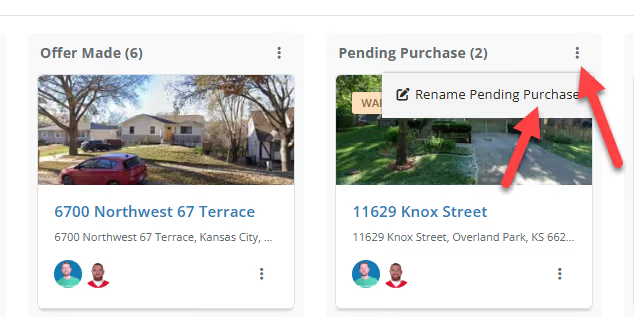
Yes, you can rename the stages of your Lead and Active Project pipelines to match your specific internal workflow and deal-flow process.
Yes, FlipperForce comes with a pre-built workflow, but it is completely customizable so you can change the Stage names to fit your specific business needs.
How to Customize Your Workflow Stage Names:
It's incredibly easy to customize your Workflow Stage names:
Locate the three dots at the top right corner of each stage column.
Click on the icon to access the "Edit Stage Name" option.
Enter your desired stage name and hit save.
That's all there is to it! Your pipeline is now perfectly personalized to your workflow.
Get immediate, feature-specific answers without digging through articles. DaveBot is here 24/7 to provide detailed explanations, troubleshooting tips, and guidance on all FlipperForce tools.