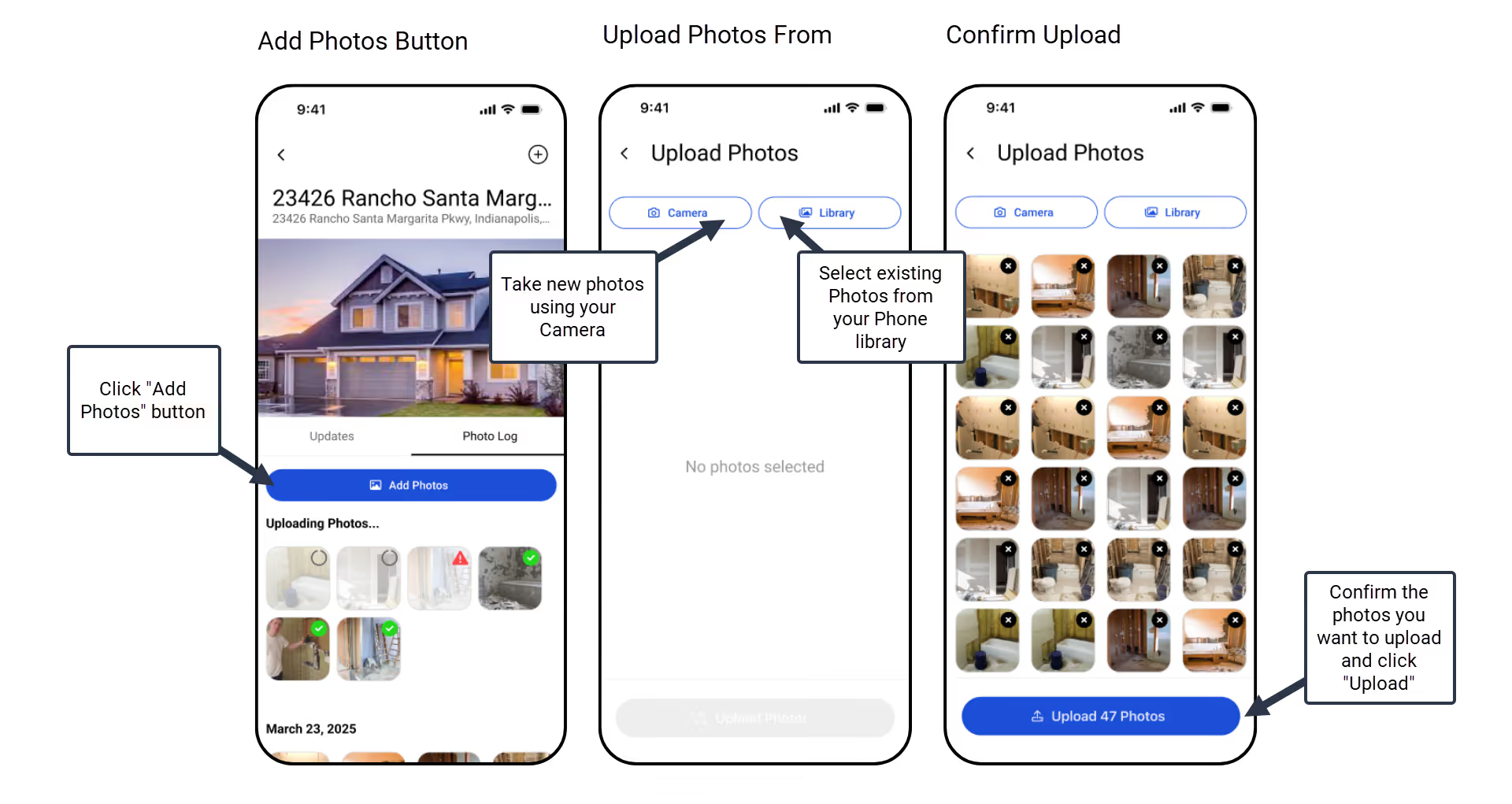
To upload photos, navigate to the Photos tab in your project and tap Add Photos to capture new images or select existing files from your library. Photos upload in the background and will appear in your Photo Timeline with a green checkbox once they are successfully synced.
To add new photos, simply navigate to the "Photos" tab within a specific project and tap the "Add Photos" button. You'll then be presented with two convenient options for uploading:
Take New Photos (using your Camera): This option is ideal if you want to walk around the property and capture photos as you go. Photos taken this way will not be saved to your phone's camera roll, helping you save storage space on your device.
Use Existing Photos (from your Library): This option is perfect if you've already taken a batch of photos and want to bulk upload them directly from your phone's photo library. You can select and upload multiple photos simultaneously using this method.
Once you've selected your photos, tap the "Upload Photos" button. The upload process will begin in the background, and you'll see a small upload indicator on each photo as it's being uploaded. After a photo successfully uploads, a green checkbox will appear, and it will be added to your project's Photo Timeline.
Get immediate, feature-specific answers without digging through articles. DaveBot is here 24/7 to provide detailed explanations, troubleshooting tips, and guidance on all FlipperForce tools.