We’ve launched two new reports to make reconciling your FlipperForce data against your bank and credit card statements seamless.

Global Transaction Report

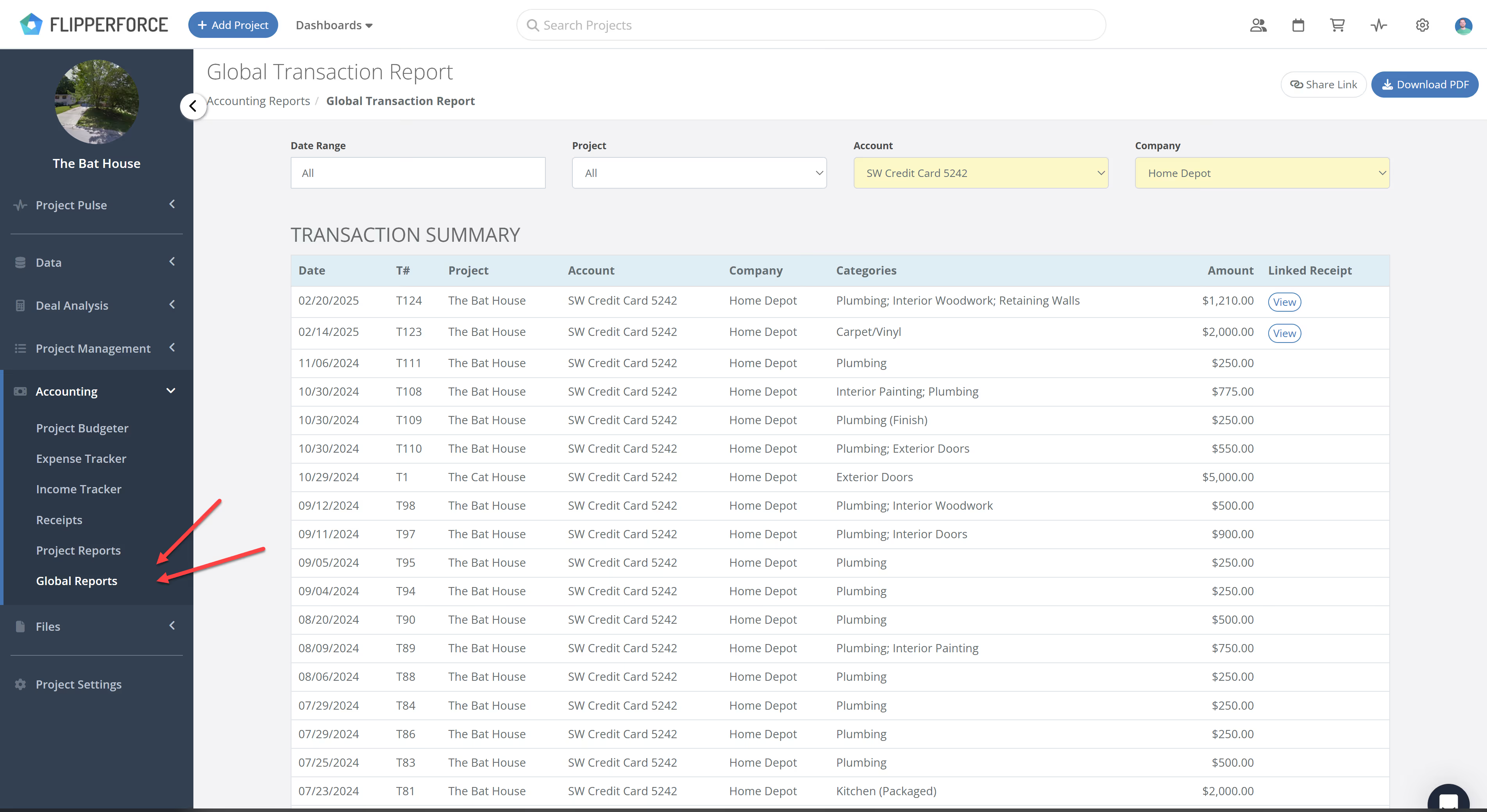
This report consolidates every transaction across your entire portfolio into a single master list. It is particularly useful if you use one business bank account or credit card to pay for expenses across multiple projects. By using the Account Filter, you can match your charges line-by-line against your bank statement without having to jump between individual project screens.
image

Project Transaction Report

This provides a high-level view of all financial activity for a single project. It is the quickest way to audit a specific project's health and ensure every expense is accounted for.

How It Works

You can find these new reports in two locations:

  • Global Transactions: Go to the Global Accounting Reports section.
  • Project Transactions: Go to the Accounting tab within any project and select Project Reports.

Both reports include filters at the top to help you drill down by Financial Account (Bank/Credit Card), Date Range, and Company.

Why Reconciliation Matters

Reconciliation is the only way to ensure your Final Profit Statement is 100% accurate. By matching FlipperForce expenses to your actual bank activity, you catch duplicate charges, identify missing receipts, and ensure your books are 100% accurate for tax season and business partners.


Dave Robertson
February 19, 2026
5 min read
Our blog

Other Recent Blog Posts

New Features

New Task Template Editor!

Easily edit existing task templates and add subtasks directly from your workspace settings.
Dave Robertson
February 14, 2026
5 min read
General

FlipperForce Named One of the Best BRRRR Analysis Tools for 2026

FlipperForce was recently named a top BRRRR analysis tool for our ability to simplify both complex deal analysis and the day-to-day management of rehab projects.
Dave Robertson
February 13, 2026
5 min read
New Features

New Task Manager Subtasks

Learn how our new Subtask feature helps you declutter your Task manager.
Dave Robertson
February 5, 2026
5 min read
New Features

New Transaction Grouping for Expenses

Easily reconcile your project spending by grouping individual expenses into searchable transaction totals that match your bank statements.
Dave Robertson
February 2, 2026
5 min read
New Features

New Activity Log Filtering

We’ve made a quick improvement to the Workspace and Project Activity Logs to help you find information faster.
Dave Robertson
January 31, 2026
5 min read
New Features

New: Smart "Adjustment" Flags for AI Receipts

We’ve added a new safeguard to our AI Receipt Analyzer to help ensure your project totals match your actual spending, even when a receipt is messy or incomplete.
Dave Robertson
January 28, 2026
5 min read

Ready to Take Action?

Sign up for a free trial and join over 1,000 house flippers and real estate investors that have taken their business to the next level!