We’ve added a new Subtask feature to the Task Manager to help you organize granular project details without cluttering your main task list.

You can now create checklists within any individual task to manage smaller to-dos and "boots on the ground" details in one place.
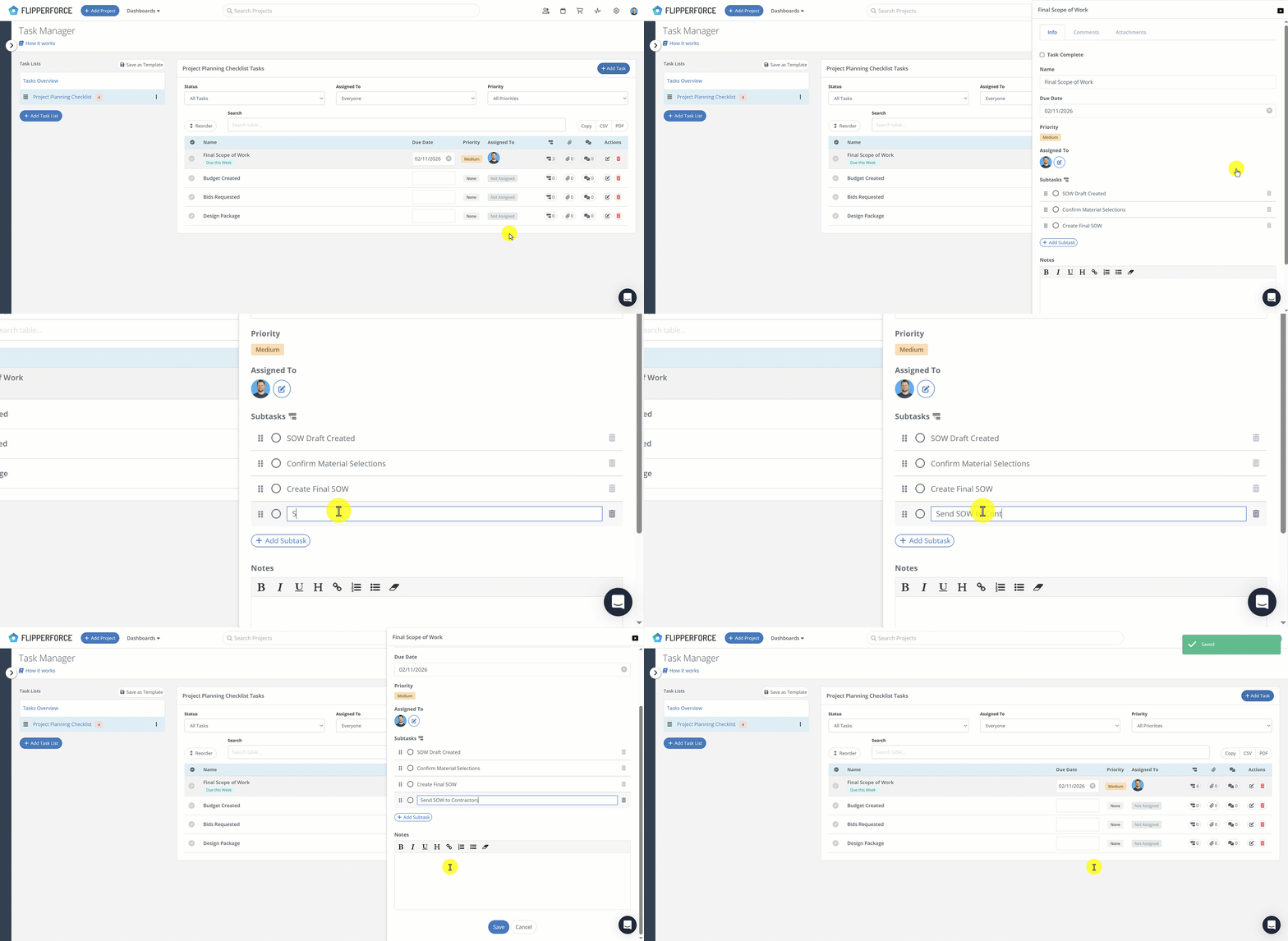
How it works:

  • Add Subtasks: Within any task, look for the new Subtask option at the bottom. Simply click the "Add Subtask" button to build your checklist.
  • Reorder: Use the drag-and-drop handles to reorder your subtasks as needed.
  • Templates: Subtasks are automatically saved when you create or update a Task Template, so your checklists are ready to go for every new project.

From Feedback to Launch in 36 Hours

This feature is a direct result of a recent conversation with one of our users. They mentioned that their Task Manager was getting a bit too cluttered with minor details, so we got to work immediately. Our team was able to move from that initial feedback to a live, working feature in less than 36 hours.

We love collaborating with our community to build tools that solve real-world problems, so keep the feedback coming!


Dave Robertson
February 2, 2026
5 min read
Our blog

Other Recent Blog Posts

New Features

Project Overview Revamp for Improved Organization and Clarity

Manage your entire project from one centralized "Command Center" that combines settings, status tracking, and critical tools into a single, high-clarity view.
Dave Robertson
May 12, 2026
5 min read
New Features

New % of Cost Desired Profit Calculation

You can now calculate your Desired Profit based on a % of Total Project Costs in the Flip Analyzer and save it as a global default in your settings for faster, ROI-driven deal analysis.
Dave Robertson
April 27, 2026
5 min read
New Features

Bulk Import Your Home Depot Purchase History

Stop wasting hours on manual data entry by using the FlipperForce AI-powered importer to instantly transform your Home Depot purchase history into a fully categorized, real-time look at your budget vs. actuals.
Dave Robertson
April 13, 2026
5 min read
New Features

Advanced Project Duplication and Configuration

Streamline your workflow by using our new project cloning feature to create "Master Templates" that automatically load your entire project schedule, budget, and task lists in one click.
Dave Robertson
April 10, 2026
5 min read
New Features

🚀 New AI-Powered Bulk Expense Importer

Our new AI-Powered Bulk Expense Importer makes it easy to get your expenses imported and categorized without the manual data entry.
Dave Robertson
March 31, 2026
5 min read
New Features

New Bulk Company Importer

Our new AI-powered Company Importer makes it easy to import your company data, so you can quickly assign your vendors and contractors to project schedules, expenses, and bids.
Dave Robertson
March 9, 2026
5 min read

Ready to Take Action?

Sign up for a free trial and join over 1,000 house flippers and real estate investors that have taken their business to the next level!