What are Project Milestones, why should I use them, and how do I edit them?
What are Project Milestones, why should I use them, and how do I edit them?
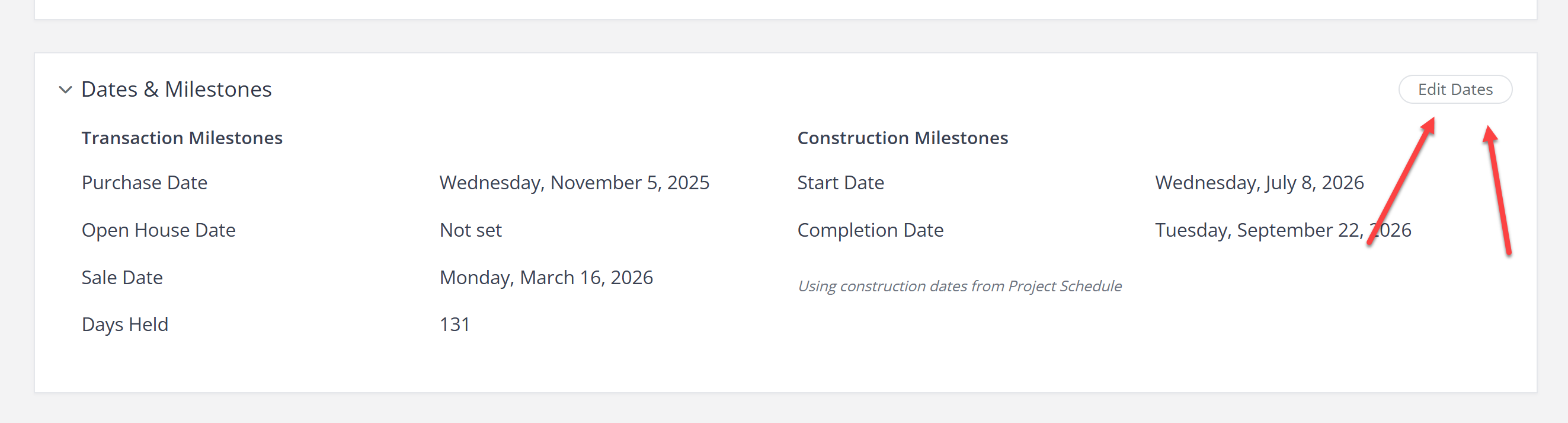
Project Milestones are key dates organized into Transaction and Construction categories. Edit them from the Project Overview page, or sync construction dates directly from your Project Scheduler.
Project Milestones help you track key dates throughout your project so you stay on schedule and manage critical deadlines.
Dates Are Organized Into Two Categories
Milestones are grouped into two distinct categories for better flow:
Transaction
Property Purchase Date
Open House Date
Property Sale Date
Construction
Construction Start Date
Construction Completion Date
Construction start and completion dates can be entered manually, or you can check the box to use the construction dates from your Project Scheduler. That option automatically pulls the first and last dates from your project schedule.
Why Use Project Milestones?
Provides a clear timeline of critical events
Helps you and your team meet deadlines
Gives you a quick overview of important project dates
How Do I Edit Project Milestones?
Navigate to the Project Overview page.
Click the Edit button within the Project Milestones section.
A modal window will open, allowing you to enter or modify the milestone dates.
Save your changes.
We are currently building additional transaction milestones and the ability to add your own Custom Dates, so you can track every deadline unique to your workflow.
Get immediate, feature-specific answers without digging through articles. DaveBot is here 24/7 to provide detailed explanations, troubleshooting tips, and guidance on all FlipperForce tools.