FlipperForce is a data organization tool and does not provide tax, legal, or accounting advice. This information is for educational purposes only and should not be relied upon for tax compliance. IRS rules are complex and subject to change. We strongly recommend consulting with a qualified tax professional to review your data and ensure you are meeting all current federal and state requirements.
Overview
Tax season is rarely "fun," but for house flippers, it can be downright overwhelming. When you’re managing multiple projects, dozens of contractors, and thousands of transactions, the January to February 1099 scramble is a major source of stress. Between chasing down W-9s and manually adding up payments, it’s easy to see why this is one of the most hated tasks in real estate.
The good news? The IRS requirements are actually quite consistent, and with the right systems, you can automate almost the entire process. This guide breaks down exactly what you need to do to stay compliant and how the "FlipperForce Way" eliminates the manual math.
Quick Takeaways
- The Deadline: You must furnish and file 1099-NEC forms by Monday, February 2, 2026.
- The $600 Rule: A 1099 is required for any non-corporate independent contractor (LLCs, Sole Proprietors) paid $600 or more for services in a calendar year.
- Who is Exempt: Generally, you do not need to send 1099s to Corporations (S-Corps or C-Corps).
- Payment Methods Matter: Only report payments made by Cash, Check, or ACH. Do not report payments made via Credit Card or third-party apps like PayPal (those are reported via 1099-K).
- Automation is Key: FlipperForce aggregates your expenses across all projects instantly, identifies eligible vendors, and exports the data to a CSV for easy filing.
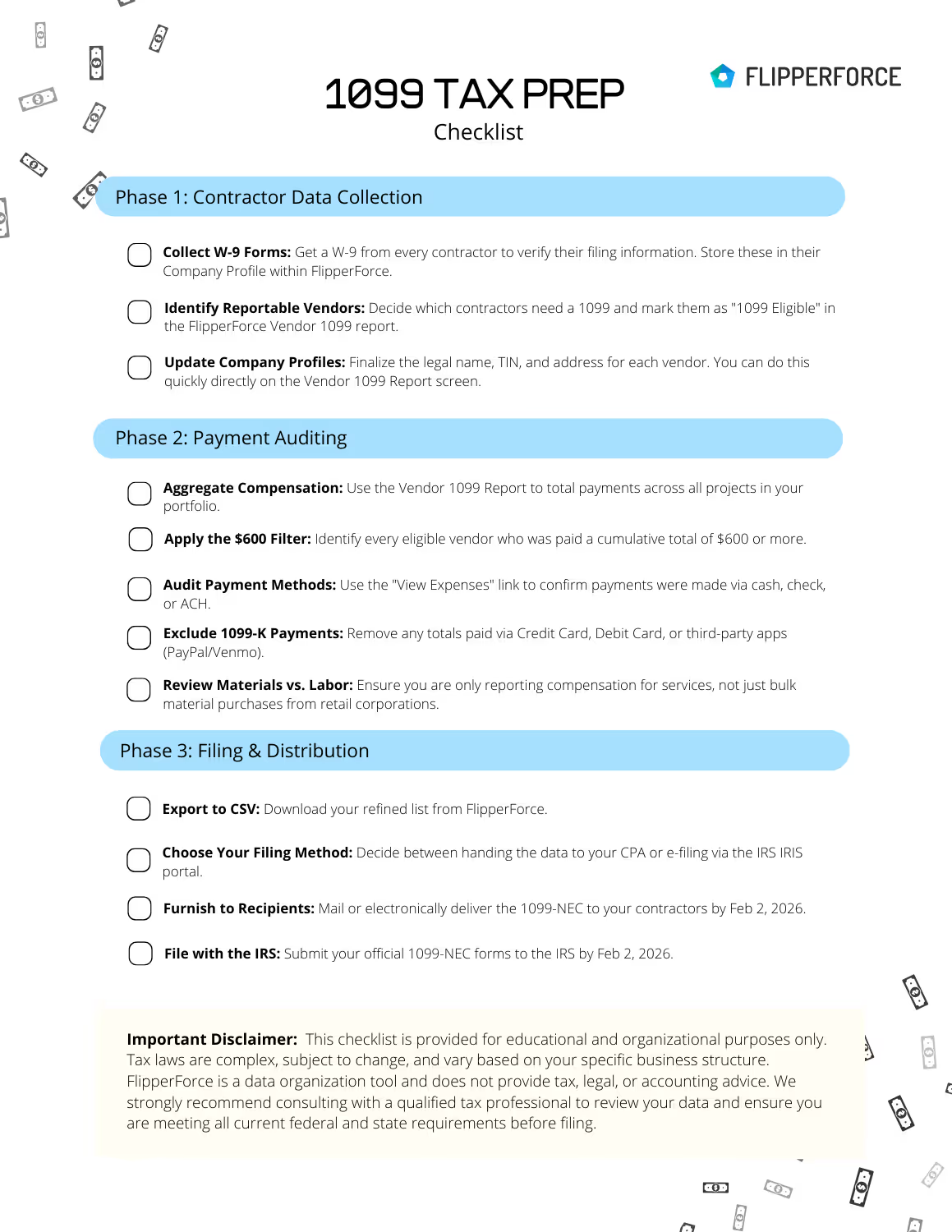
Get Your Step-by-Step 1099-NEC Filing Checklist
Stop the manual math and guessing games. This actionable guide helps you audit your contractors, verify payment methods, and organize your data for a stress-free tax season.
Download Now1. The Core Rules: Who, What, and When?
If you aren't familiar with Vendor 1099s, the IRS essentially wants to ensure that independent contractors are reporting their income. As a business owner, it is your responsibility to report payments that meet these three criteria:
Who Needs a 1099?:
You must file for any individual or non-corporate entity you hired for your business. This includes:
- Sole Proprietors & Individuals (e.g., a local handyman working under his own name).
- Partnerships (e.g., a roofing duo operating as a general partnership).
- Most LLCs: Any "Limited Liability Company" that isn't taxed as a corporation. (e.g., "Smith Painting LLC").
- WHO is Exempt: Generally, you do not need to issue a 1099 to Corporations (including S-Corps and C-Corps). If your contractor is "Home Depot" or a large incorporated electrical firm, no 1099 is required.
- Special Exception—Attorneys: You must send a 1099 to your attorney even if they are incorporated.
Who is Exempt?
Generally, you do not need to issue a 1099 to Corporations (including S-Corps and C-Corps).
- Large Retailers: You don't send a 1099 to Home Depot, Lowe's, or Sherwin-Williams.
- Incorporated Contractors: If your HVAC company is "Johnson Heating & Air, Inc.", they are usually exempt.
What is the Threshold?
You must file if the total payments to a recipient for services reached $600 or more during the calendar year. This is a cumulative total across every house you flipped that year.
How you Paid (payment Method Rules)
This is one of the most misunderstood rules. You only report payments made by Cash, Check, or ACH (Direct Deposit).
- Do NOT report payments made via Credit Card, Debit Card, or third-party processors like PayPal or Venmo. These processors are responsible for reporting those totals themselves via Form 1099-K. If you include them on your 1099-NEC, you are effectively double-reporting the contractor's income.
When is the Deadline?
The deadline to furnish 1099-NEC forms to contractors and file with the IRS is Monday, February 2, 2026.
2. Common Examples: Who Gets a 1099?
To help clarify the "Who," here is a quick reference table for common house flipping scenarios:
| Vendor Type |
Example Scenario |
Do they get a 1099? |
| Individual / Sole Prop |
You paid Mike the Electrician $2,500 by check. |
YES |
| LLC (Non-Corp) |
You paid "Quality Roofs LLC" $8,000 via ACH. |
YES |
| Incorporated Law Firm |
You paid $1,500 in legal fees to an S-Corp law firm. |
YES (Attorneys always included) |
| S-Corp Contractor |
You paid an incorporated HVAC company $5,000. |
NO |
| Big Box Retailer |
You bought $12,000 in lumber from Home Depot. |
NO |
| Digital Payment |
You paid a plumber $800 via PayPal (Business). |
NO (Reported via 1099-K) |
3. Common Pain Points for Flippers
Before we get to the solution, let’s look at why this process is traditionally so tedious for investors:
Pain Point #1: Multiple Project Aggregation Nightmare
Unlike a traditional business that might have one office and a few vendors, a house flipper is essentially running several small businesses (projects) at once.
- The Reality: "Mike the Plumber" might have fixed a leak at Project A in February, roughed in a bathroom at Project B in June, and did a final trim-out at Project C in November.
- The Pain Point: If you are using simple spreadsheets, you have to search through three different tabs or files, find Mike's name, and manually add those payments together. It is incredibly easy to miss a single check, which can lead to under-reporting and an IRS "red flag."
Pain Point #2: Chasing the "Paper Trail" for Payment Methods
The IRS has a very specific "Check and Cash Only" rule for 1099s.
- The Reality: You might pay a contractor with a business check for a big job, but then reimburse them $50 for extra supplies via Venmo or buy them a piece of equipment on your business credit card.
- The Pain Point: When it comes time to file, you have to audit every single transaction. If you simply pull a "Total Paid to Vendor" report from a bank, it doesn't distinguish between a check (reportable) and a credit card payment (not reportable). Flippers often spend days cross-referencing bank statements against receipts to make sure they aren't double-reporting income that the credit card company is already reporting on a 1099-K.
Pain Point #3: The Missing W-9 Scramble
The best time to get a W-9 is before you hand over the first check.
- The Reality: In the heat of a renovation, things move fast. You hire a new drywaller on a Monday, and he's finished by Thursday. You pay him, and he moves on to the next job.
- The Pain Point: Come January, you realize you don't have his Social Security Number or his legal business name. Now, you’re stuck cold-calling a contractor who might not be working for you anymore, desperately trying to get them to text you a photo of their W-9 so you can meet the February 2nd deadline.
Pain Point #4. Confusion Over Entity Status
The IRS rules for who gets a 1099 are based on how a business is legally structured, not just their name.
- The Reality: A contractor might have "LLC" in their name, but that doesn't automatically mean they need a 1099 (if they've elected to be taxed as an S-Corp, they are exempt).
- The Pain Point: Without a centralized system to track these designations, flippers often find themselves "guessing" or wasting time sending 1099s to corporations that don't actually need the which just creates more "junk mail" and confusion for everyone involved.
The FlipperForce Way: Automating the Scramble
The Vendor 1099 Report in FlipperForce was built to solve these exact pain points by shifting the burden from your memory to the software. Instead of you acting as a manual auditor, the platform acts as a centralized database for your entire flipping business.
A. Automatic Multi-Project Aggregation
The biggest time-saver is the software's ability to "see" your entire portfolio at once. FlipperForce automatically scans every payment logged in your Expense Trackers across all projects. It identifies payments made to the same vendor, regardless of which property they worked on, and instantly totals them for the calendar year. This eliminates the "spreadsheet hunt" and ensures that if a contractor earned $200 on three different houses, they correctly show up as meeting the $600 threshold.
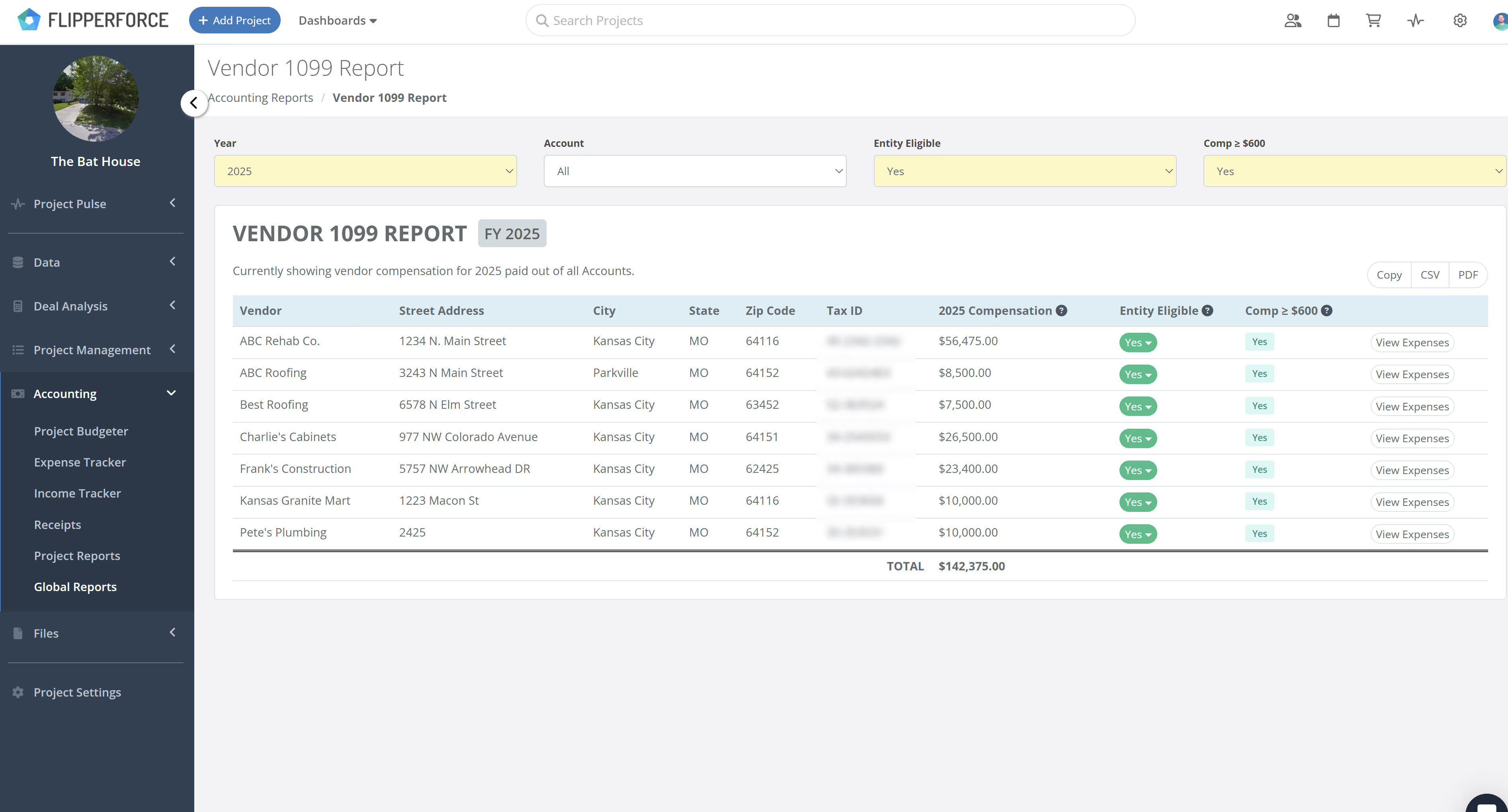
B. Smart Eligibility & Compensation Filtering
Not every vendor in your contact list needs a 1099. FlipperForce provides two powerful filters to help you isolate your "To-Do" list in seconds:
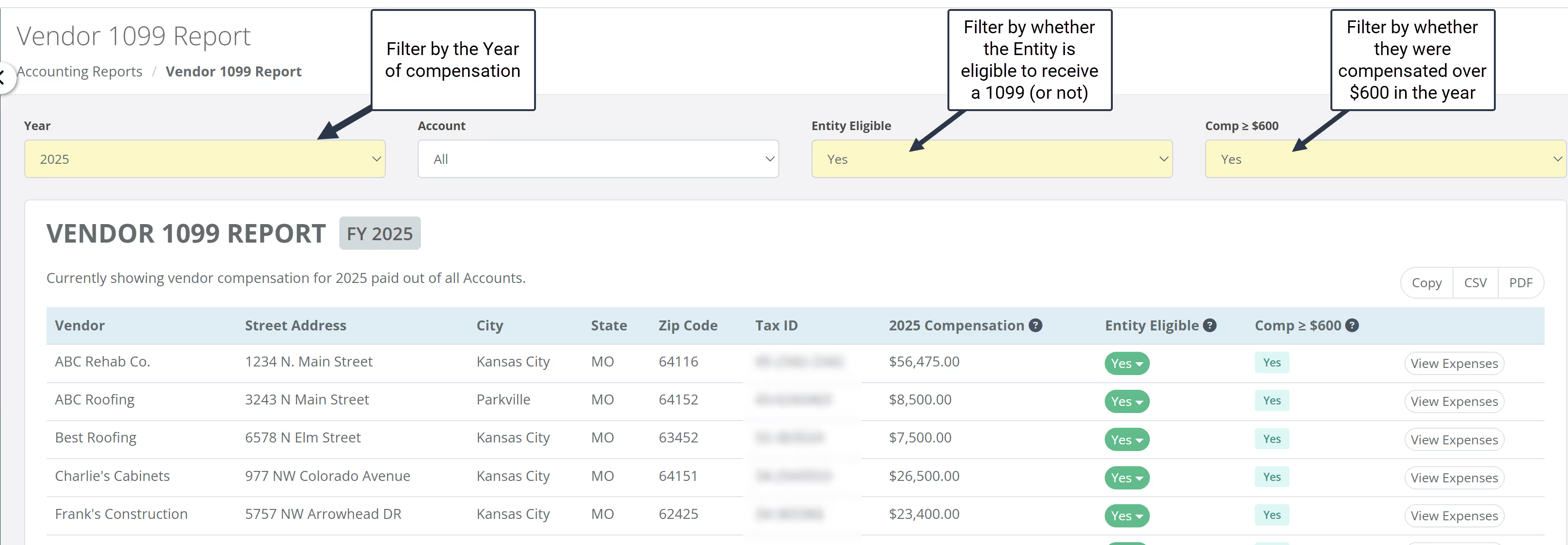
- The 1099 Eligible Filter: Using a simple dropdown menu, you can designate a vendor as "Eligible" (Sole Prop, Partnership, or LLC). You can then filter your entire report to show only these vendors, hiding big-box retailers and corporations that don't require reporting.
- The >$600 Filter: Once you’ve filtered for eligibility, you can toggle the compensation filter. This instantly hides any contractor who fell below the $600 IRS threshold, leaving you with a refined list of exactly who needs a form.
C. Editing Data on the Fly
One of the most frustrating parts of tax season is realizing you have incomplete data. In FlipperForce, you don't have to navigate away from the report to fix a mistake.
- Instant Updates: If you notice a vendor is missing a Tax ID (TIN) or a mailing address, you can click the Edit Company option directly from the report view.
- Master Profile Sync: Any information you enter in the report—like the legal name from their W-9—automatically updates their master profile across your entire account, ensuring your records are clean for future flips.
D. The Final Audit: View Expenses & Account Verification
To ensure 100% accuracy and avoid "double-reporting," FlipperForce provides a "View Expenses" link for every vendor. This takes you to a detailed Global Vendor Expense Report that lists every transaction making up that vendor's total.
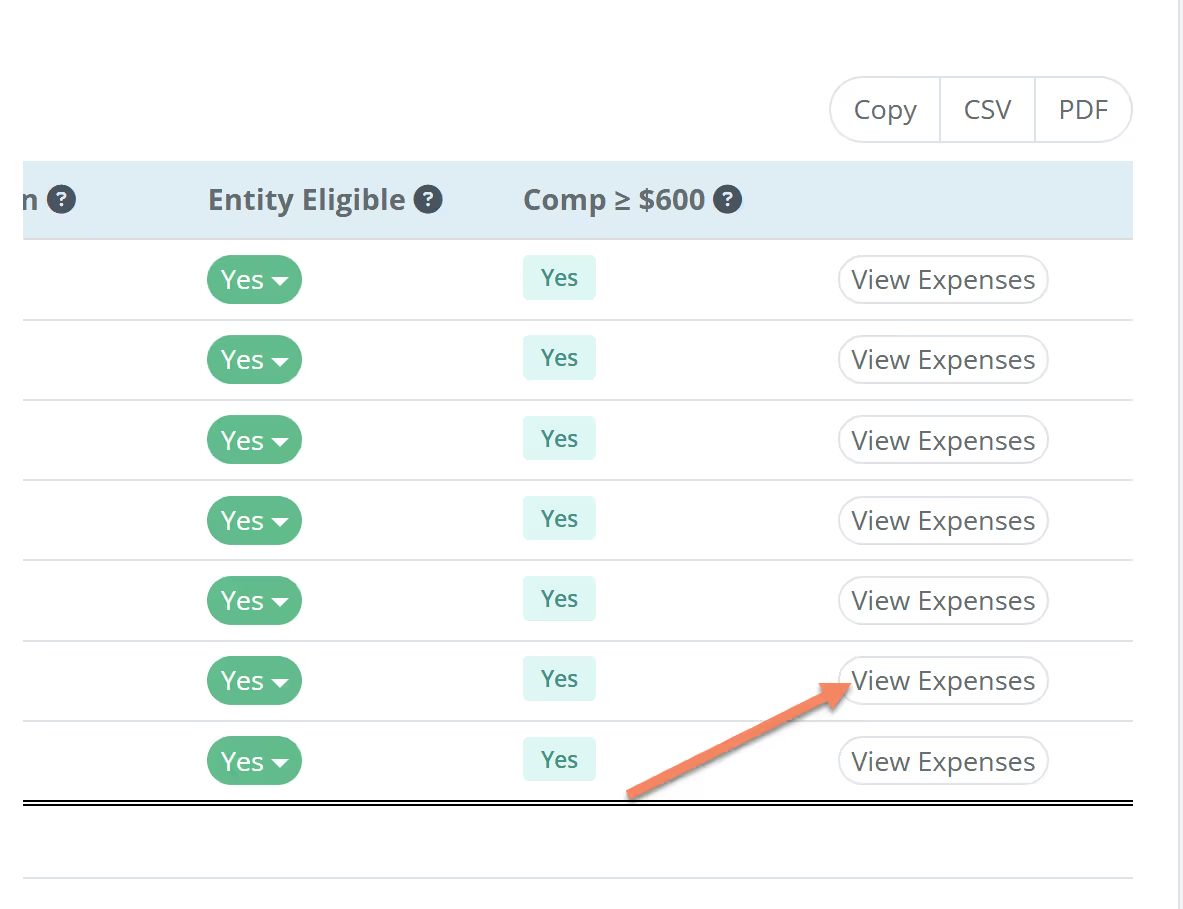
- The Account Column: This is your secret weapon. You can quickly scan the "Account" column to see which payments were made via your checking account versus a business credit card.
- Precision Reporting: If you see a credit card payment included in the total, you know to exclude that amount from your 1099 filing, ensuring you strictly follow the IRS payment method rules.
E. Effortless Export for Filing
Once you’ve reviewed your totals and verified your contractor info, the final step is a single click. Use the Export to CSV option to download your data.
- For your Accountant: Send the clean CSV file directly to your CPA, and they will have everything they need to file on your behalf.
- For Self-Filers: Use the formatted data to e-file directly through the IRS IRIS portal.
5. The Final Verdict: Why You Can’t Afford to Wait
While 1099 reporting might feel like just another administrative hurdle, the IRS takes these deadlines very seriously. For the 2025 tax year, the penalty for failing to file a correct 1099-NEC on time starts at $60 per form if you’re just a few days late, but quickly escalates to $340 or more per form if you miss the summer cutoff. If the IRS determines "intentional disregard"—meaning you simply chose not to file—the penalties can skyrocket to $680 per form with no maximum cap.
When you multiply those fines by the number of contractors you worked with across all your flips, the cost of "getting around to it later" becomes a major hit to your bottom line.
Closing: Taking the Stress Out of Tax Season
We hope the Vendor 1099 report helps you automate this very tedious and intimidating process. We know tax time isn't fun and is often confusing, so we built these features to handle the heavy lifting—summarizing your compensation, identifying eligible contractors, and auditing your payment methods—so you can get back to the job site.
As a final reminder, tax laws can be complex and vary based on your specific business structure. While FlipperForce is a powerful tool to organize your data, it does not provide tax, legal, or accounting advice. We strongly recommend reaching out to a qualified tax professional to review your data and ensure you are meeting all current federal and state requirements.
Tax, Legal, and Accounting Disclaimer
No Professional AdviceThe information provided in this article is for informational and educational purposes only. It is not intended to be a substitute for professional tax, legal, or accounting advice. FlipperForce is a financial data organization tool, and its use does not create an accountant-client or attorney-client relationship.
Accuracy of Information
While we strive to provide accurate and up-to-date information, tax laws and IRS regulations are complex and subject to frequent change. We make no warranties or representations regarding the completeness, reliability, or accuracy of the content. Any reliance you place on such information is strictly at your own risk.
User Responsibility
You are solely responsible for your own tax compliance, including the accuracy of your filings and meeting all IRS deadlines. FlipperForce, its affiliates, and its employees shall not be held liable for any tax-related issues, penalties, or damages arising from the use of or reliance on the information or tools provided herein.
Consult a Professional
Before implementing any financial strategies or making tax-related decisions, we strongly recommend that you consult with a qualified tax professional, CPA, or attorney to ensure compliance with all current federal, state, and local requirements as they apply to your specific business structure.

