With our latest update you can now save scope of work notes with your Estimate Templates which can save you hours of time creating Scopes of Work for your projects!

Note: In order to see these changes in your account you will need to clear your Cache!

SOW Starter Templates

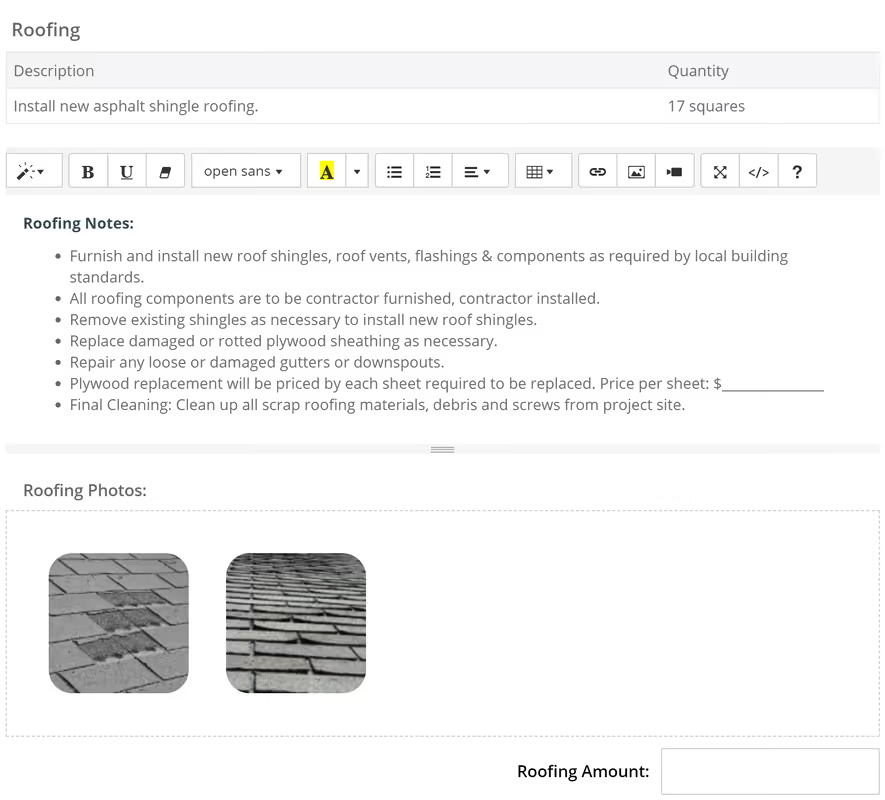
Our Estimator Templates are pre-built with Starter Scope of Work Notes that describe the Scope of Work that the Contractor needs to provide in their proposal.

Roofing SOW Example:

  • Furnish and install new roof shingles, roof vents, flashings & components as required by local building standards.
  • All roofing components are to be contractor furnished, contractor installed.
  • Remove existing shingles as necessary to install new roof shingles.
  • Replace damaged or rotted plywood sheathing as necessary.
  • Repair any loose or damaged gutters or downspouts.
  • Plywood replacement will be priced by each sheet required to be replaced. Price per sheet: $_______________
  • Final Cleaning: Clean up all scrap roofing materials, debris and screws from project site.


You can use our Starter notes to help you get started and then edit, customize and save your own SOW notes that you can use on future projects!

Instead of it taking hours to create a Scope of Work, you can now create a SOW in minutes! ⏲️

Roofing Scope of Work Notes

Coming Soon (Export to Word & PDF)! 😲

Right now you can share your Scope of Work using the share link, but we are working on new functionality that will allow you to export your Scope of Work Document to Word or PDF!  

With Export to Word, you will be given additional customization options to further customize the Scope of Work using traditional document creation applications such as Microsoft Word, Google Doc or Apple Pages.
Dave Robertson
February 1, 2019
5 min read
Our blog

Other Recent Blog Posts

New Features

Override Auto Scheduling with New Date Lock Feature

You can now lock any task in the Scheduler to a specific start date, overriding Auto Scheduling for that task. It's perfect for pinning tasks to dates your contractors have committed to, while the rest of your schedule keeps rescheduling automatically around it.
Dave Robertson
July 24, 2026
5 min read
New Features

Introducing Project Team: Always Know Who's Running the Project

Learn how the new Project Team feature automatically tracks your internal team members and companies on every flip, so you always know who's managing the project and how to reach them.
Dave Robertson
July 6, 2026
5 min read
New Features

User Management: New Role and Access Visibility

User Management now includes a Role & Access column, giving workspace owners and admins instant visibility into each user's project and feature access without having to dig into individual settings.
Dave Robertson
July 1, 2026
5 min read
New Features

Comps Tool: Thumbs Up, Thumbs Down Comp Selection

Thumbs up to select your best comps, thumbs down to push the bad ones to the bottom — keeping your list clean and your Comps Report focused on the properties that actually matter.
Dave Robertson
June 25, 2026
5 min read
New Features

New Public API Endpoints for Expenses

Our new Public API update allows developers and custom AI tools to securely connect to the FlipperForce Expense Tracker to automate data entry, feed custom dashboards, and sync project financial records directly from external business apps.
Dave Robertson
June 21, 2026
5 min read
New Features

Companies & Contacts: Tax & Insurance Status at a Glance

Tax & Insurance column added to Companies & Contacts, giving you instant visibility into W-9 status and color-coded Workers Comp and General Liability expiration dates for every contractor in your workspace at a glance.
Dave Robertson
June 11, 2026
5 min read

Ready to Take Action?

Sign up for a free trial and join over 3,000 house flippers and real estate investors that have taken their business to the next level!