We're excited to announce a big upgrade to our Leads and Active Project Pipelines – the ability to customize your Stage names!

We know that every real estate business is unique, and our pre-built workflows may not always fit your specific needs. That's why we've made it possible to tailor your Pipeline workflows and Stage names to match your exact business process.

How to Customize Your Stage Names:

It's incredibly easy to customize your Workflow:
image
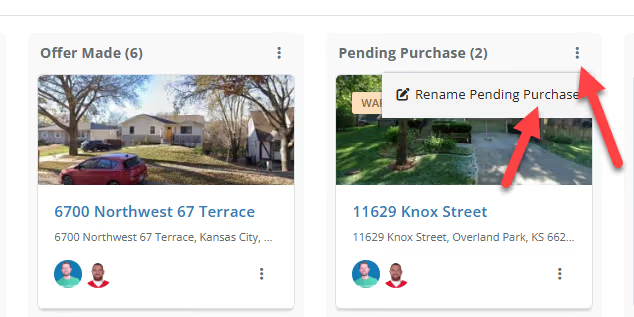
  1. Locate the three dots at the top right corner of each stage column.
  2. Click on the icon to access the "Edit Stage Name" option.
  3. Enter your desired stage name and hit save.

That's all there is to it! Your pipeline is now perfectly personalized to your workflow.

Benefits of a Customizable Workflow:

  • Flexibility: Whether you handle fix-and-flips, wholesale deals, or a mix of strategies, you can now create stage names that reflect your actual workflow.
  • Your Business, Your Way: FlipperForce adapts to you, not the other way around.
  • Clarity & Organization: A customized pipeline means no more confusion or mismatched stages. Your workflow is crystal clear at a glance.

We're always listening to your feedback and working to make FlipperForce the best it can be. Try out the new custom stage names today and let us know what you think!


Dave Robertson
September 4, 2024
5 min read
Our blog

Other Recent Blog Posts

New Features

New Task Template Editor!

Easily edit existing task templates and add subtasks directly from your workspace settings.
Dave Robertson
February 14, 2026
5 min read
General

FlipperForce Named One of the Best BRRRR Analysis Tools for 2026

FlipperForce was recently named a top BRRRR analysis tool for our ability to simplify both complex deal analysis and the day-to-day management of rehab projects.
Dave Robertson
February 13, 2026
5 min read
New Features

New Task Manager Subtasks

Learn how our new Subtask feature helps you declutter your Task manager.
Dave Robertson
February 5, 2026
5 min read
New Features

New Transaction Grouping for Expenses

Easily reconcile your project spending by grouping individual expenses into searchable transaction totals that match your bank statements.
Dave Robertson
February 2, 2026
5 min read
New Features

New Activity Log Filtering

We’ve made a quick improvement to the Workspace and Project Activity Logs to help you find information faster.
Dave Robertson
January 31, 2026
5 min read
New Features

New: Smart "Adjustment" Flags for AI Receipts

We’ve added a new safeguard to our AI Receipt Analyzer to help ensure your project totals match your actual spending, even when a receipt is messy or incomplete.
Dave Robertson
January 28, 2026
5 min read

Ready to Take Action?

Sign up for a free trial and join over 1,000 house flippers and real estate investors that have taken their business to the next level!