BRRRR Analyzer

How can I setup my Default BRRRR Analyzer settings?

How can I setup my Default BRRRR Analyzer settings?

To set up Default BRRRR Analysis Settings, click your user profile avatar in the top right navbar or visit tools.flipperforce.com/analysis-settings. These settings pre-fill values to speed up your deal analysis.

You can setup analysis settings for all of your commonly used analysis values and costs upfront to help save you time and analyze your house flip deals faster than ever!

You can setup your default analysis settings here:
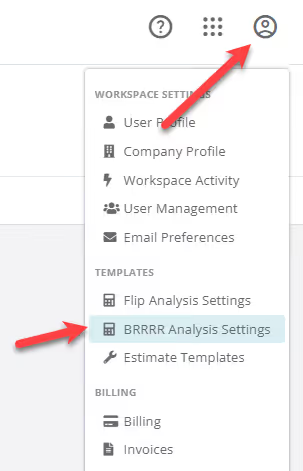
https://app.flipperforce.com/analysis-settings

Here's How Default Analysis Settings Work:

Related Video

Setting Up Your BRRRR Analysis Settings
Learn how to setup all of your commonly used analysis settings upfront, to save you time when you analyze BRRRR Deals using the BRRRR Analyzer tool!
8:35

Related FAQs

Still Have Questions?  DaveBot can help!

Get immediate, feature-specific answers without digging through articles. DaveBot is here 24/7 to provide detailed explanations, troubleshooting tips, and guidance on all FlipperForce tools.
Chat with DaveBot (Be Nice, I'm in Beta)!